 SPSS TUTORIALS
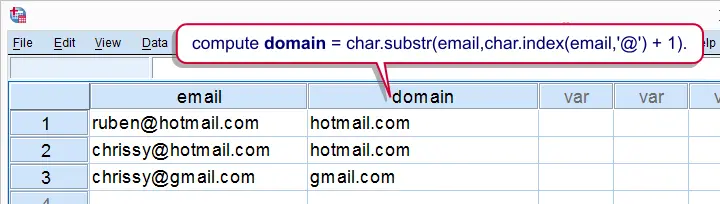
Working with string variables in SPSS is pretty straightforward if one masters some basic string functions. This tutorial will quickly walk you through the important ones.
SPSS Main String Functions
CHAR.SUBSTR(substring) - Extract character(s) from stringCONCAT(concatenate) - Combine stringsCHAR.INDEX- Find first occurrence of character(s) in stringCHAR.RINDEX(right index) - Find last occurrence of character(s) in string- REPLACE - Replace character(s) in string by different one(s)
CHAR.LENGTH- Return number of characters in string- LTRIM (left trim) - Remove leading spaces (or, rarely, other characters)
- RTRIM (right trim) - Remove right trailing spaces (or, rarely, other characters)
LOWER(lower case) - Convert all letters to lower caseUPCASE(upper case) - Convert all letters to upper case
SPSS Syntax Example
We asked respondents to type in their first name, surname prefix and last name. We'd like to combine these into full names and correct some irregularities such as incorrect casing and double spaces. For creating some test data, close all open datasets and run the syntax below.
*Create mini test dataset.
set unicode off.
data list free/s1 s2 s3 (3a20).
begin data
'ANNEKE' ' VAN DEN ' 'BERG' 'daan' '' 'balvert' 'a' '' 'b'
end data.
set unicode off.
data list free/s1 s2 s3 (3a20).
begin data
'ANNEKE' ' VAN DEN ' 'BERG' 'daan' '' 'balvert' 'a' '' 'b'
end data.
1. Correcting First Names
- One approach is to first correct each name component separately and then combine them.
- For the data at hand, first names should start with a capital and remaining letters should be in lower case.
- We'll break things up in small steps. We'll gradually combine these using substitution: using functions within functions.
- It's recommended you inspect the results carefully after running each step.
- Note there's separate tutorials on substrings and concatenate.
*1. Declare new string variables.
string n1 to n4 (a20).
*2. Extract first letter of first name.
compute n1 = char.substr(s1,1,1).
exe.
*3. Convert to upper case.
compute n1 = upcase(n1).
exe.
*4. Substitution: use substring function within upcase function.
compute n1 = upcase(char.substr(s1,1,1)).
exe.
*5. Extract remaining letters and convert to lower case.
compute n1 = lower(char.substr(s1,2)).
exe.
*6. Substitution: concatenate results from previous attempts.
compute n1 = concat(upcase(char.substr(s1,1,1)),lower(char.substr(s1,2))).
exe.
string n1 to n4 (a20).
*2. Extract first letter of first name.
compute n1 = char.substr(s1,1,1).
exe.
*3. Convert to upper case.
compute n1 = upcase(n1).
exe.
*4. Substitution: use substring function within upcase function.
compute n1 = upcase(char.substr(s1,1,1)).
exe.
*5. Extract remaining letters and convert to lower case.
compute n1 = lower(char.substr(s1,2)).
exe.
*6. Substitution: concatenate results from previous attempts.
compute n1 = concat(upcase(char.substr(s1,1,1)),lower(char.substr(s1,2))).
exe.
2. Correcting Surname Prefixes
- Since these are Dutch names, surname prefixes should be entirely in lower case.
- However, we'll first remove any leading spaces using the
LTRIMfunction. - Next we'll replace double by single spaces. For correcting longer sequences of spaces, see the second syntax example of SPSS LOOP Command.
*1. Remove leading spaces.
compute n2 = ltrim(s2).
exe.
*2. Substitution: remove leading spaces and convert to lower case.
compute n2 = lower(ltrim(s2)).
exe.
*3. Replace double spaces by single spaces.
compute n2 = replace(n2,' ',' ').
exe.
compute n2 = ltrim(s2).
exe.
*2. Substitution: remove leading spaces and convert to lower case.
compute n2 = lower(ltrim(s2)).
exe.
*3. Replace double spaces by single spaces.
compute n2 = replace(n2,' ',' ').
exe.
3. Combining First and Last Names
- For last names, the same rules hold as for first names: the first letter in upper case and remaining letters in lower case.
- Therefore, we can reuse the expression we wrote for the first names after some minor modifications.
- Now, combining first, middle and last names requires slightly more than a basic concatenation. This is because SPSS automatically right pads string values with spaces to match the length of the string variable.
- Therefore, concatenating 3 strings with length 20 results in a string with length 60. In case of insufficient variable width, only the first characters are shown. This is what happens in the example below (although it looks like the concatenation is not working).
- In Unicode mode
RTRIMis applied automatically. However, including it in the syntax anyway ensures that things will work properly regardless whether or not SPSS is in Unicode mode or not.
*1. Reuse capitalization syntax used for first name on last name.
compute n3 = concat(upcase(char.substr(s3,1,1)),lower(char.substr(s3,2))).
exe.
*2. If rtrim is omitted, concat doesn't seem to work.
compute n4 = concat(n1,n2,n3).
exe.
*3. Correct concatenation but spaces should be inserted.
compute n4 = concat(rtrim(n1),rtrim(n2),rtrim(n3)).
exe.
*4. Final concatenation.
compute n4 = concat(rtrim(n1),' ',rtrim(n2),' ',rtrim(n3)).
exe.
*5. Replace double spaces by single spaces.
compute n4 = replace(n4,' ',' ').
exe.
compute n3 = concat(upcase(char.substr(s3,1,1)),lower(char.substr(s3,2))).
exe.
*2. If rtrim is omitted, concat doesn't seem to work.
compute n4 = concat(n1,n2,n3).
exe.
*3. Correct concatenation but spaces should be inserted.
compute n4 = concat(rtrim(n1),rtrim(n2),rtrim(n3)).
exe.
*4. Final concatenation.
compute n4 = concat(rtrim(n1),' ',rtrim(n2),' ',rtrim(n3)).
exe.
*5. Replace double spaces by single spaces.
compute n4 = replace(n4,' ',' ').
exe.
4. Flag Single Letter Names
- Unfortunately, not all respondents filled out their real names. Many of such cases can't be detected from the data at hand but some suspicious patterns are easily identified.
- One such pattern are very short (1 or 2 letter) first or last names. Since we have those separately in the data we can use
CHAR.LENGTHto flag these cases. - For combined names, the first name consists of all letters up to the first space. We can find it by using the
CHAR.INDEXfunction. - Reversely, the last name holds all letters after the last space which can be found by
CHAR.RINDEX. Subtracting the position of the last space from the length of the name returns the length of the last name. - For example, "Anneke van den Berg" are 19 letters. The last space is the 15th letter. Now 19 minus 15 returns 4 - which is indeed the length of "Berg".
*1. Find short first/last names from separate name components.
compute flag_1a = char.length(s1).
compute flag_1b = char.length(s3).
exe.
*2. Find short first/last names from combined names.
compute flag_2a = char.index(n4,' ') -1.
compute flag_2b = char.length(n4) - char.rindex(rtrim(n4),' ').
exe.
compute flag_1a = char.length(s1).
compute flag_1b = char.length(s3).
exe.
*2. Find short first/last names from combined names.
compute flag_2a = char.index(n4,' ') -1.
compute flag_2b = char.length(n4) - char.rindex(rtrim(n4),' ').
exe.
THIS TUTORIAL HAS 18 COMMENTS:
By Ruben Geert van den Berg on August 19th, 2015
Do you want to check whether each case has identical values on both variables? If so, try this:
compute check = (strvar1 = strvar2).frequencies check.
This creates a new variable, "check", holding zeroes for cases who have different values on both variables. So if FREQUENCIES shows that "check" contains only ones, the variables are identical. If "check" holds any zeroes, running
sort cases check.moves cases with different values on both variables to the top of your dataset, allowing for easy inspection.
By Sheila de Koning on November 25th, 2015
One of the (string) variables that I'm working with has a long value list. It's a ICD 10 list with cause of death. Now, I would like to combine some values (death due to cardiac diseases) into a new variable 0-1 cause of death cardiovasculair yes/no.
How do I write the syntax? Here an example of some of the values:
I50.9 = "Heart failure, unspecified"
I51 = "Complications and ill-defined descriptions of heart disease"
Hope you can help. Thanks in advance!
By Ruben Geert van den Berg on November 25th, 2015
How many distinct ICD10 values are there in your data? Flagging cases having "heart" in one or more string variables is easy enough but I'd very carefully inspect whether this simple rule correctly classifies each distinct ICD10 code. One way for doing so is using AGGREGATE with ICD10 as
breakvariable.A very basic example of the flagging syntax would be
data list free/icd10(a20).begin data
'heart disease'
'Heart failure'
'kindney failure'
end data.
compute flag = char.index(lower(icd10),'heart') > 0.execute.
Note here that
char.indexreturns 0 when the substring is not present in the string value.By Sheila de Koning on November 26th, 2015
Thanks Ruben Geert!
There are approximately 450 distinct ICD10 value labels and over 75 different circulatory and heart diseases. The problem is that they don't have all 'heart', 'cardiac' or 'circulation' in the name. The variable value label starts with a letter than number followed with a description (e.g. J17= Pneumonia in diseases classified elsewhere or I50.1 = Left ventricular failure). The value labels for cardiovascular diseases starts with the capital letter 'I' followed by a number (but not in increasing order).
Can I use the basic example for flagging syntax in this case? I assume this will be a long list then...
By Ruben Geert van den Berg on November 26th, 2015
Wait... you told me the ICD10 codes were in a string variable. But now you're mentioning value labels? Technically, value labels can be applied to string values but this is very rarely seen in practice.
If value labels starting with "I" unambiguously identify all cardiovasculair causes of death, then simply flag such cases instead of cases having "heart" in the description. However, do make sure there's no exceptions to this rule. If you're unsure how to do it technically, send me (a sample of) some data by email and I'll take a look.