 SPSS TUTORIALS
Some SPSS commands such as RECODE and ALTER TYPE can make irreversible changes to variables. Before using these, I like to clone the variables that I'm about to edit. This allows me to compare the edited to the original versions.
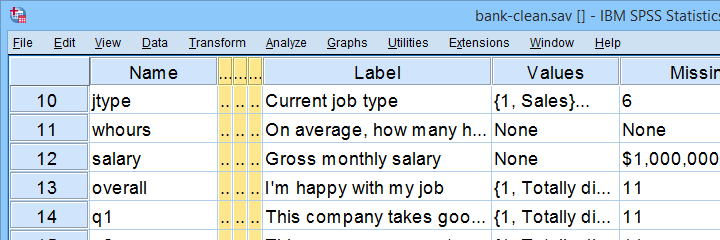
This tutorial presents a super easy tool for making exact clones of variables in SPSS. We'll use bank-clean.sav (partly shown below) for all examples.
Prerequisites & Installation
Installing this tool requires
- SPSS version 24 or higher with
- the SPSS Python 3 essentials installed.
Recent SPSS versions usually meet these requirements.
Download our tool from SPSS_TUTORIALS_CLONE_VARIABLES.spe. You can install it from
 as shown below.
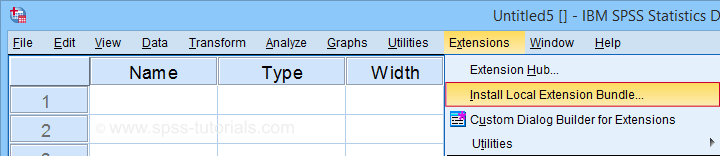
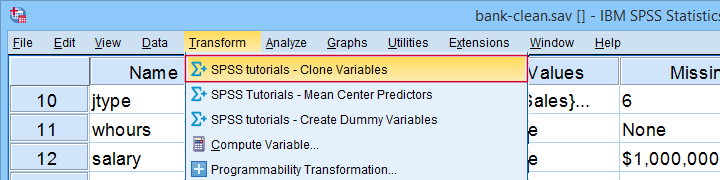
After completing these steps, you'll find SPSS tutorials - Clone Variables under Transform.
Clone Variables Example I
Let's first clone jtype -short for job type- as illustrated below.
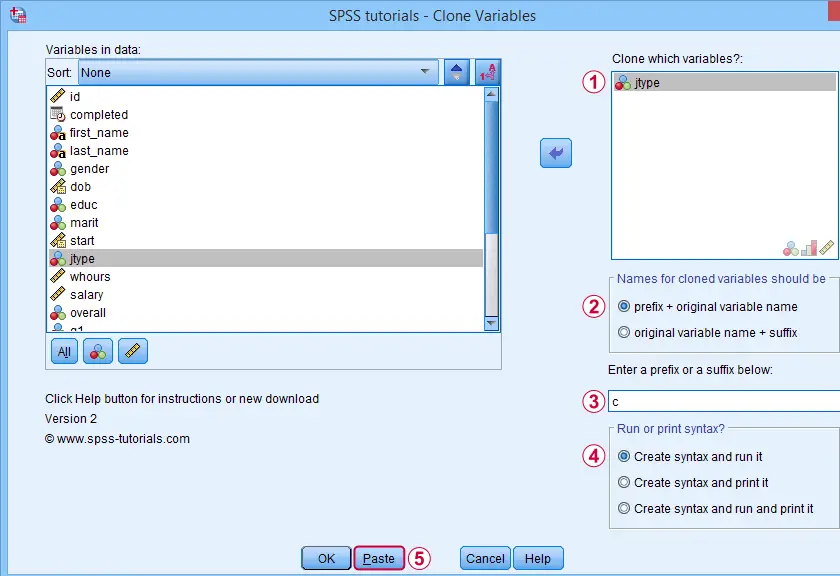
Completing these steps results in the SPSS syntax below. Let's run it.
SPSS_TUTORIALS_CLONE_VARIABLES VARIABLES=jtype
/OPTIONS FIX="c" FIXTYPE=PREFIX ACTION=RUN.
Result
Note that SPSS has now added a new variable to our data: cjtype as shown below.
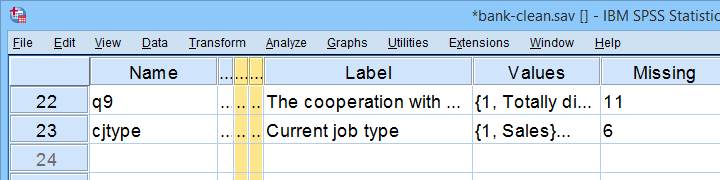
Except for its name, cjtype is an exact clone of jtype: it has the same
- variable type and format;
- value labels;
- user missing values;
- and so on...
There's one minor issue with our first example: the syntax we just pasted only runs on SPSS installations with our tool installed.
The solution for this is to have the tool print native syntax instead: this syntax is typically (much) longer but it does run on any SPSS installation. Our second examples illustrates how to do just that.
Clone Variables Example II
Let's create native syntax for cloning a couple of different variables, including a string variable and a date variable.
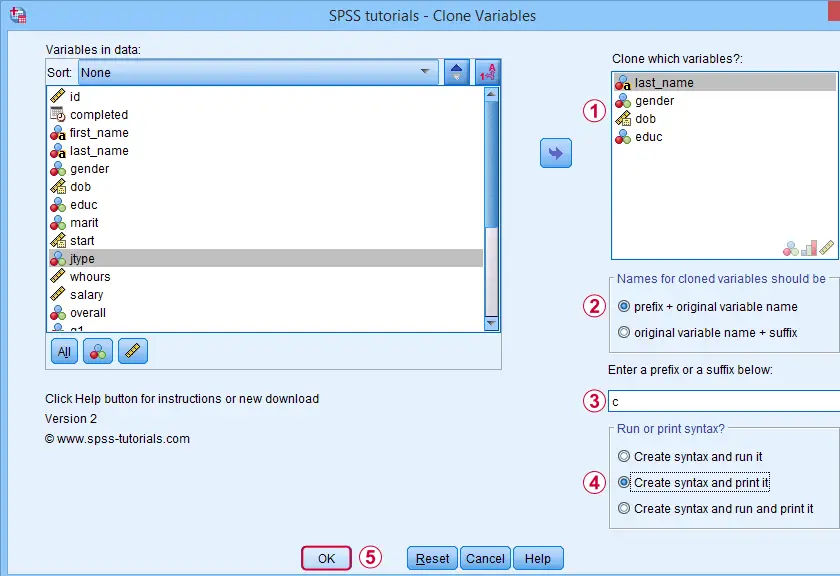
 This option has our tool print native syntax into our output window.
 Because we chose to print (rather than run) syntax, this is one of the rare occasions at which we click Ok instead of Paste.
Result
Note that we now have native syntax for cloning several variables in our output window.
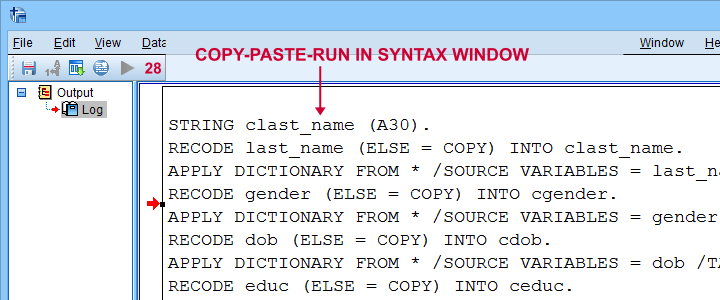
For actually running this syntax, we can simply copy-paste-run it in a syntax window.The entire syntax is shown below.
STRING clast_name (A30).
RECODE last_name (ELSE = COPY) INTO clast_name.
APPLY DICTIONARY FROM * /SOURCE VARIABLES = last_name /TARGET VARIABLES = clast_name.
RECODE gender (ELSE = COPY) INTO cgender.
APPLY DICTIONARY FROM * /SOURCE VARIABLES = gender /TARGET VARIABLES = cgender.
RECODE dob (ELSE = COPY) INTO cdob.
APPLY DICTIONARY FROM * /SOURCE VARIABLES = dob /TARGET VARIABLES = cdob.
RECODE educ (ELSE = COPY) INTO ceduc.
APPLY DICTIONARY FROM * /SOURCE VARIABLES = educ /TARGET VARIABLES = ceduc.
If our tool creates very long syntax, you could copy it into a separate file and run it from an INSERT command.
Right, I guess that should cover this simple but handy little tool. Hope you'll give it a try and hope you'll find it helpful. If you've any remarks, feel free to throw me a quick comment below.
Thanks for reading!
THIS TUTORIAL HAS 40 COMMENTS:
By Ruben Geert van den Berg on June 29th, 2019
Hi Daniel, thanks for your comment!
First off, if you're still using SPSS macros, you're going to love Python for SPSS. It's like moving from the menu to syntax: you'll wonder what on earth you've been wasting your time on...
Second, nice thing about numeric suffixes is that they allow for stuff like
RECODE att_04 to att_12 (LO THRU 6 = 0)(ELSE = 1) INTO datt_04 to datt_12.
in which the second variable spec are all new variables. This'll only work if the new variables end with numeric suffixes: att_04d to att_12d wouldn't do the job.
Best regards from Amsterdam!
Ruben
By Claudio on June 30th, 2020
I like that tool - could you update it to Python 3 as IBM stopped supporting Python 2?
By Ruben Geert van den Berg on July 1st, 2020
Hi Claudio!
Yeah, we should. However, I'm probably not going to find the time for it any time soon.
Note, however, that you can still use Python2.x: you can install Python 2.7.15 and then link it with SPSS via Edit - Options - File locations.
Hope that helps!
Ruben
SPSS tutorials
By Andreas on June 29th, 2021
Hi Ruben,
I tried everything on SPSS 27 to run the Clone Tool. I keep getting this error:
_SLINE 3 2.
BEGIN PROGRAM PYTHON3.
_SLINE OFF.
_SLINE 5 2.
SPSSTUTORIALS CLONE VARIABLES VARIABLES ='G_FileNumber' PREFIX ='copy_'.
_SLINE OFF.
Could you help me out?
Thanks a lot in advance!
Kind regards
Andreas Delaere
By Ruben Geert van den Berg on June 30th, 2021
Dear Andreas,
We've a new version of this tool which you can download here. I just tested it on SPSS 28 and it works fine on my system. Please give it a go and let me know if it works for you too.
Kind regards,
Ruben Geert van den Berg
SPSS tutorials