 SPSS TUTORIALS
SPSS Computes Wrong Week Numbers?
Wrong Week Numbers - Quick Demo
While working on data holding a record for each day, I wanted to create some graphs on week level. So I extracted the weeks with XDATE.WEEK but the week numbers returned by SPSS are nonsensical: every week starts on January 1 and most years end up with week 53 holding just 1 day.
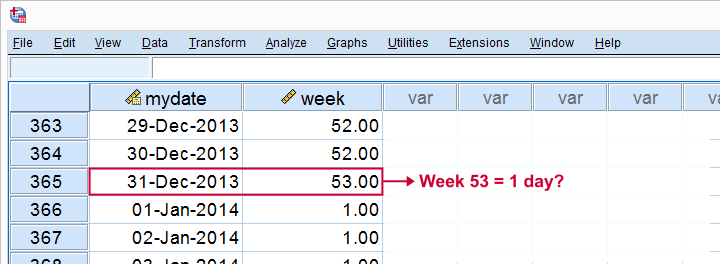
There's different standards for week numbers but I think the very definition of a week is a 7 day time span. The following syntax demonstrates the problem.
SPSS Week Numbers Syntax Example
input program.
loop mydate = 1 to 500.
end case.
end loop.
end file.
end input program.
execute.
*Convert mydate into actual date.
compute mydate = datesum(date.dmy(1,1,2013),mydate - 1,'days').
formats mydate (date11).
*Extract week and year from mydate.
compute week = xdate.week(mydate).
execute.
The result in data view may look normal at first. However, when we scroll down to case 365, we see that week 53 consists of 1 day. Like so, SPSS’ week numbers don't correspond to any conventional standard and can neither be converted into one.
ISO weeks in GoogleDocs
Interestingly, Google sheets has the isoweeknum function returning the ISO weeks I'm looking for. So a “workable solution” seemed to copy-paste these into an SPSS data file. Finally, MATCH FILES by date seemed to do the trick. And then I realized...
In the ISO week system, dates around new year’s can fall into a week from a different year. And unfortunately, GoogleDocs does not provide the years to which weeks belong. The screenshot below attempts to illustrate the problem.
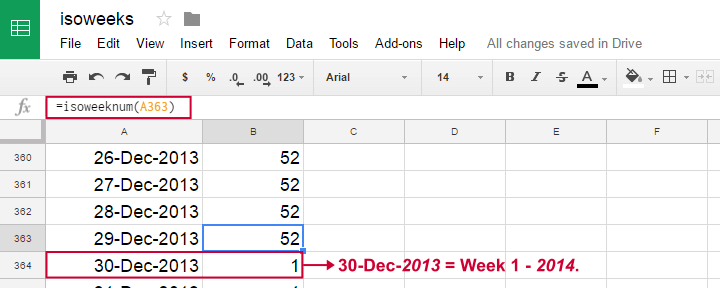
Right. So extracting the year from December 30, 2013 obviously returns 2013. However, it falls in week 1, 2014. And neither SPSS nor GoogleDocs offers a function that'll insert 2014 into my dataset for this date.
Solution
Perhaps a bit of an anti climax but... no solution so far. I could go and look for a huge table holding a long date range and all ISO weeks plus the years in which they fall. And convert it to SPSS. And merge it into several data files. But I'd much rather avoid such an ugly solution.
So... any suggestions anybody? Please drop me a comment below if you've a better idea.
Thanks for reading!
Convert String Date to SPSS Date Variable
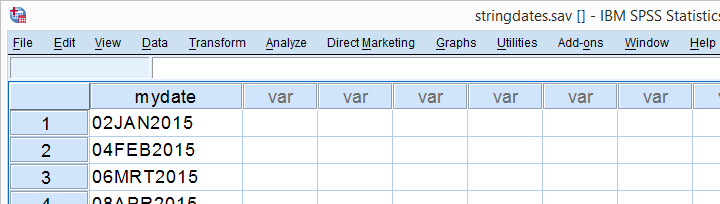
“I've a string variable in my data holding dates formatted as ‘01JAN2016’ without separators between the day, month and year components. To make things worse, the month abbreviations are in Dutch and 3 of those differ from their English counterparts. How can I change this string into an SPSS date variable?”
Step 1: Add Separators
The data are in stringdates.sav. Now, generally, ALTER TYPE is the way to go for this job but the day-month-year separators missing poses a problem here. The solution is to add those by combining CONCAT with CHAR.SUBSTR . We'll do so in a new string variable because this allows us to inspect if the conversion succeeded.
Syntax 1
string newdate(a11).
*Add day, month, year from old string to new string and separate these components with dashes.
compute newdate = concat(
char.substr(mydate,1,2), /*start at character 1, extract 2 characters (day)
'-',
char.substr(mydate,3,3), /*start at character 3, extract 3 characters (month)
'-',
char.substr(mydate,6,4) /*start at character 6, extract 4 characters (year)
).
*Check if result is as desired.
execute.
*Convert stringdate with dashes to SPSS date variable.
alter type newdate (date11).
Step 2: Inspect Results
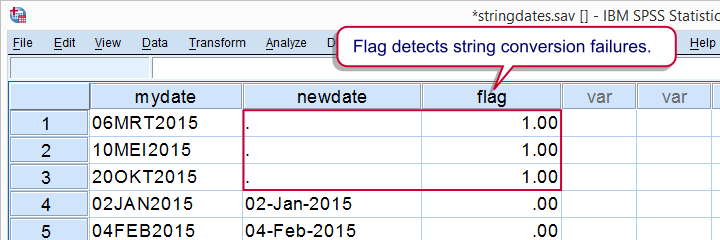
A huge flaw in ALTER TYPE is that it may result in system missing values without throwing any error or warning if it can't convert one or more values. Failing to detect this -not unlikely in larger datasets- may result in severely biased results. We'll therefore flag cases -if any- which have a system missing value on our new date variable but not an empty string value on our input variable.
Syntax 2
compute flag = (missing(newdate) & mydate <> '').
*Move flagged cases -if any- to top of dataset.
sort cases by flag(d).
Result
Step 3: Replace Some Month Abbreviations
Note that we flagged some conversion failures but one case with an empty string value on our input variable is not one of them. The Dutch month abbreviations (such as “MRT” instead of “MAR”) are the reason for this. Fortunately, only 3 month abbreviations differ between English and Dutch.
We'll now convert our outcome variable back to string and recompute it. After doing so, we'll REPLACE the three deviant abbreviations in a DO REPEAT loop. After doing just that, we'll successfully convert our new variable into a date variable.
Syntax 3
delete variables flag.
*Change newdate back to string.
alter type newdate(a11).
*Recompute newdate as previously.
compute newdate = concat(
char.substr(mydate,1,2), /*start at character 1, extract 2 characters (day)
'-',
char.substr(mydate,3,3), /*start at character 3, extract 3 characters (month)
'-',
char.substr(mydate,6,4) /*start at character 6, extract 4 characters (year)
).
*Replace 3 Dutch abbreviations with their English counterparts.
do repeat #old = 'MRT' 'MEI' 'OKT' /#new = 'MAR' 'MAY' 'OCT'.
compute newdate = replace(newdate,#old,#new).
end repeat.
*Check if result is as desired.
execute.
*Convert to SPSS date variable - second attempt.
alter type newdate(date11).
Result
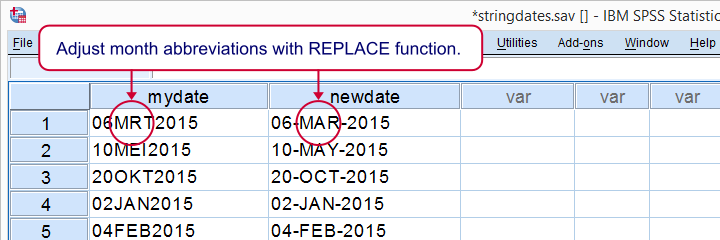
As we readily see, our conversion has now fully succeeded. In a larger dataset, you might want to inspect the result more carefully by flagging conversion failures like we did previously.
We really enjoyed writing this little tutorial. It nicely shows how combining the right building blocks gets a seemingly complicated job done with minimal effort and perfect precision. Hope you liked it too!
SPSS – Convert String into Date Variable
For converting string variables to date variables, ALTER TYPE is the way to go. This tutorial demonstrates how to do this and points out a couple of caveats. For those who can't use ALTER TYPE, we'll propose some alternatives.
SPSS Alter Type
The syntax below first creates a mini dataset holding 8 string variables. They demonstrate the 8 most common date formats. Next, each string variable is converted to a date variable by using ALTER TYPE.
SPSS String to Date Syntax
data list free/d1 to d8(8a20).
begin data
31-dec-99 31.dec.1999 12/31/99 12-31-1999 31.12.99 31/12/1999 99-12-31 1999.12.31
end data.
*2. Convert all strings to dates.
alter type d1(date9).
alter type d2(date11).
alter type d3(adate8).
alter type d4(adate10).
alter type d5(edate8).
alter type d6(edate10).
alter type d7(sdate8).
alter type d8(sdate10).
String to Date Syntax Notes
- The date format in
ALTER TYPEtells SPSS which component is the year, month and day. So if1/2/3means 1 February 2003, useEDATE8(dd-mm-yy). If it means January 2nd, 2003, useADATE8(mm-dd-yy) and so on. - In the original string variable, the year, month and day may be separated by a dash (-), a slash (/), a period (.) or even a combination of these. It doesn't matter which one is used.
- If two digits are used for years, numbers 0 through 44 are interpreted as years 2000 through 2044. Numbers 45 through 99 are interpreted as 1945 through 1999. If that's not to your liking, use SET EPOCH...
ALTER TYPEoverwrites existing values and is not reversible. It's usually no big problem if things go wrong here as long as you stick to sound practices such as working from syntax. Additionally, you can use SPSS Clone Variables Tool beforeALTER TYPE.
SPSS String to Date without Alter Type
Note that ALTER TYPE can only be used for a limited number of date formats. Some more exotic formats may require a more flexible approach. Second, those on SPSS versions 15 and below don't have ALTER TYPE since it was introduced in version 16.
For both scenarios, we'll usually extract the year, month and day by using SUBSTR, often combined with INDEX and RINDEX. We'll then convert these into an SPSS date variable by using the DATE.DMY function. Finally, we'll display the number of seconds it holds as a more readable date by using FORMATS.
SPSS String to Date Syntax
data list free/s1 s2(2a20).
begin data
1.1.1999 1-jan-99 2.28.1999 2-feb-99 3.31.1999 3-mar-99 4.30.1999 4-apr-99 5.31.1999 5-may-99 6.30.1999 6-jun-99
7.31.1999 7-jul-99 8.31.1999 8-aug-99 9.30.1999 9-sep-99 10.31.1999 10-oct-99 11.30.1999 11-nov-99 12.31.1999 12-dec-99
end data.
*2. Extract day, month and year from string.
compute day = number(char.substr(s1,char.index(s1,'.') + 1,char.rindex(s1,'.') - char.index(s1,'.')),f2.0).
compute month = number(char.substr(s1,1,char.index(s1,'.') - 1),f2.0).
compute year = number(char.substr(s1,char.rindex(s1,'.') +1),f4.0).
exe.
*3. Compute date variable.
compute d1 = date.dmy(day,month,year).
exe.
*4. Display as date.
formats d1(adate10).
Dealing with Months as Letters
The previous example converted the first string variable but the second is slightly harder. This is because DATE.DMY requires three numbers but months are now shown as letters (e.g. JAN, FEB and so on). An easy way to fix this is to REPLACE the months by numbers (00 through 12) using DO REPEAT as shown below. After doing so, one can proceed as in the previous example.
do repeat s = 'jan' 'feb' 'mar' 'apr' 'may' 'jun' 'jul' 'aug' 'sep' 'oct' 'nov' 'dec' / n = 1 to 12.
compute s2 = replace(s2,s,string(n,n2)).
end repeat.
exe.