 SPSS TUTORIALS
Conditions and Loops in Python
- Python “for” Loop
- Python “while” Loop
- Python “if” Statement
- Python “if-else” Statement
- Python “if-elif-else” Statement
Common parts of any computer language are conditions, loops and functions. In Python, these have fairly similar structures as illustrated by the figure below.
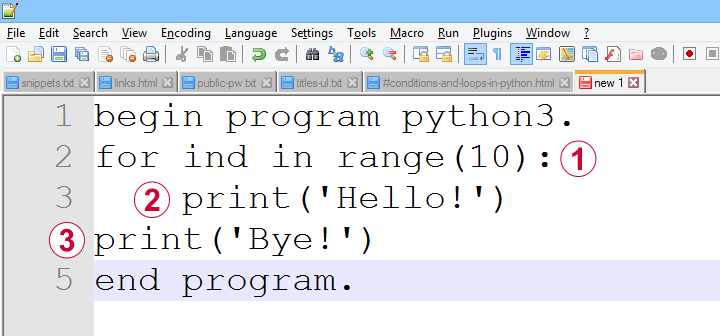
 a function, loop or condition is terminated by a colon;
 one or more indented lines indicate that they are subjected to the condition or loop or part of some function;
 an outdented line indicates that some loop, condition or function has ended.
Loops, conditions and functions are often nested as indicated by their indentation levels. The syntax below shows a commented example.
begin program python3.
for ind in range(10): # start of loop
print('What I know about {},'.format(ind)) # subjected to loop
if(ind % 2 == 0): # start of condition
print('is that it\'s an even number.') # subjected to loop and condition
else: # end previous condition, start new condition
print('is that it\'s an odd number.') # subjected to loop and condition
print('That will do.') # end condition, end loop
end program.
Let's now take a closer look at how loops and conditions are structured in Python.
Python “for” Loop
In Python, we mostly use for loops in which we iterate over all elements of an iterable object. As it's perfectly straightforward, a single example may do.
begin program python3.
countries = ['Netherlands','Germany','France','Belgium','Slovakia','Bulgaria','Spain']
for country in countries:
print(country)
print("That's all.")
end program.
Note that the indentation indicates where the loop ends: “That's it.” is printed just once because it's not indented.
Python “while” Loop
A second type of Python loop is the “while” loop. It'll simply keep iterating as long as some condition is met. Make sure that at some point the condition won't be met anymore or Python will keep looping forever -or until you somehow disrupt it anyway, perhaps with Windows’ Task Manager.
We rarely use “while” loops in practice but I'll give an example below anyway: we'll randomly sample zeroes and ones while the number of ones in our sample is smaller than 10. If we endlessly repeat this experiment, the sample sizes will follow a negative binomial distribution.
begin program python3.
import random
sample = []
while sum(sample) < 10:
sample.append(random.randint(0,1))
print(sample)
end program.
*NOTE: SECOND/THIRD/... ATTEMPTS TYPICALLY RESULT IN SHORTER/LONGER LISTS.
Python “if” Statement
Conditional processing in Python is done with if statements and they work very similarly to for and while. Let's first run a simple example.
begin program python3.
countries = ['Netherlands','Germany','France','Belgium','Slovakia','Bulgaria','Spain']
for country in countries:
if 'm' in country:
print('%s contains the letter "m".'%country)
end program.
Python “if-else” Statement
Our previous example did something if some condition was met. If the condition wasn't met, nothing happened. Sometimes that's just what we need. In other cases, however, we may want something to happen if a condition is not met. We can do so by using else as shown below.
begin program python3.
countries = ['Netherlands','Poland','Germany','Portugal','France','Belgium','Slovakia','Bulgaria','Spain']
for country in countries:
if country.startswith("S"):
print('%s starts with an "S".'%country)
else:
print('%s doesn\'t start with an "S".'%country)
end program.
Python “if-elif-else” Statement
Our last example took care of two options: a condition is met or it is not met. We can add more options with elif, short for “else if”. This means that a condition is met and none of the previous conditions in our if structure has been met.
Like so, an if structure may contain (at the same indentation level):
- 1
ifclause: do something if some condition is met; - 0 or more
elifstatements: do something if some condition but none of the previous conditions is met; - 0 or 1
elsestatements: do something if none of the previous conditions is met.
Example
begin program python3.
countries = ['Netherlands','Poland','Germany','Portugal','France','Belgium','Slovakia','Bulgaria','Spain']
for country in countries:
if country.startswith("S"):
print('%s starts with an "S".'%country)
elif country.startswith("P"):
print('%s starts with a "P".'%country)
else:
print('%s doesn\'t start with a "P" or an "S".'%country)
end program.
Quick Overview SPSS Python Modules
Basic Python can't do anything in SPSS. However, we can add extra functionality to it that makes things work. Such functionality resides in modules that we import. This basic idea is similar to installing apps on a smartphone.
Overview Main SPSS Python Modules
| Name | Meaning | Main Uses |
|---|---|---|
| spss | SPSS Functions | Have Python run the SPSS syntax it creates. Look up variable properties, variable count, case count, system settings and more. |
| spssaux | SPSS Auxiliary Functions | Get and set variable properties including value labels. Retrieve variable names by expanding SPSS TO and ALL keywords. |
| spssdata | SPSS Data Values | Look up all data values in one or many variables. Append new variables/cases to dataset. |
| os | Operating System | Look up contents of folders. Create, edit or delete files or folders. |
| SpssClient | SPSS Client | Access Output, Data Editor and Syntax windows. Batch modify SPSS Output tables or Charts. |
SPSS Python Modules - What & Why?
Python has a modular structure: there's the basic program with quite some functions built into it. And then there's a ton of modules, add-on files that extend Python's capabilities.
Like so, there's a couple of modules for having Python interact with SPSS. All modules discussed in this lesson are included in the SPSS Python Essentials so you don't need to download them.
For recent SPSS versions, they're found in a folder like C:\Program Files\IBM\SPSS Statistics\Python3\Lib\site-packages as shown below.
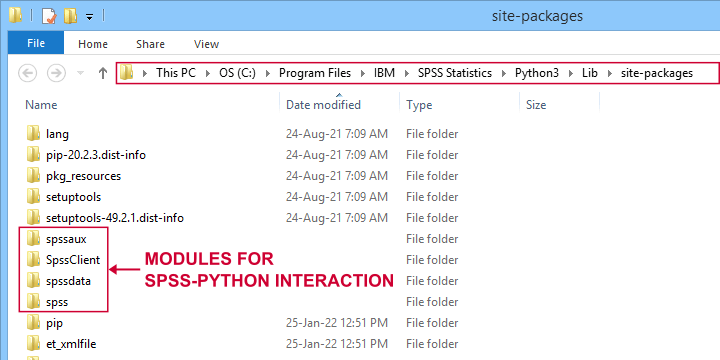
Note that the site-packages folder is also where you can create your own SPSS Python module(s) as we'll do in SPSS - Cloning Variables with Python.
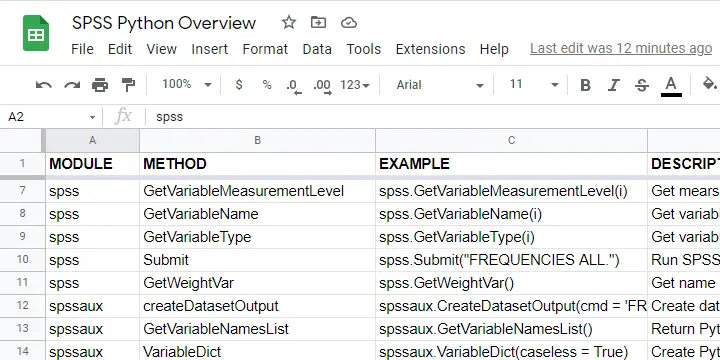
The remainder of this tutorial walks you through the main SPSS Python modules and their functions. We also created a handy overview of these in this Googlesheet (read-only).
Python spss Module
We'll use the spss module mostly for looking up SPSS dictionary information and having Python run SPSS syntax. The SPSS module is extensively documented in the SPSS Python Reference Guide (download here).
| Module | Component | Example | Description |
|---|---|---|---|
| spss | GetSetting | spss.GetSetting('tnumbers') | Get system setting from SET command. Similar to spssaux.GetSHOW. |
| spss | GetSplitVariableNames | spss.GetSplitVariableNames() | Return Python list of split variable names. |
| spss | GetVariableCount | spss.GetVariableCount() | Get number of variables in active dataset. |
| spss | GetVariableFormat | spss.GetVariableFormat(0) | Get variable format (such as F4.2, A20, date11) by Python index. |
| spss | GetVariableLabel | spss.GetVariableLabel(0) | Get variable label by Python index. |
| spss | GetVariableMeasurementLevel | spss.GetVariableMeasurementLevel(0) | Get measurement level by Python index. |
| spss | GetVariableName | spss.GetVariableName(0) | Get variable name by Python index. |
| spss | GetVariableType | spss.GetVariableType(0) | Get variable type (string or numeric) by Python index. |
| spss | Submit | spss.Submit("FREQUENCIES ALL.") | Run SPSS syntax held in Python string. |
| spss | GetWeightVar | spss.GetWeightVar() | Get name of active WEIGHT variable -if any. |
Python spssaux Module
spssaux is short for SPSS auxiliary functions and has quite some overlap with the spss module. Two important things that we'll do with spssaux are
- expand the SPSS TO keyword for looking up a range of variable names. We'll do just that in Looping over SPSS Commands with Python.
- look up value labels as we'll do in SPSS - Change Value Labels with Python.
The table below lists these and some other main uses of spssaux.
| Module | Component | Example | Description |
|---|---|---|---|
| spssaux | createDatasetOutput | spssaux.CreateDatasetOutput(...) | Create dataset holding SPSS output, similarly to SPSS OMS. |
| spssaux | GetVariableNamesList | spssaux.GetVariableNamesList() | Return Python list of all variable names in active dataset. Of limited use because most variable properties are retrieved by index instead of name. |
| spssaux | VariableDict | spssaux.VariableDict(caseless = True) | Create Python dict containing all variable names and indices. Expands SPSS TO and ALL keywords and retrieves variable properties. |
| spssaux | GetSHOW | spssaux.GetSHOW('weight') | Retrieves system setting displayed by SHOW. Has some more options than spss.GetSetting. |
| spssaux | GetValueLabels | spssaux.GetValueLabels(0) | Returns Python dict object holding value labels by index. |
| spssaux | GetVariableValues | spssaux.GetVariableValues(6) | Returns Python list holding distinct data values by index. Does not work with SPLIT FILE on. |
Python spssdata Module
The spssdata module can look up data values in SPSS for one or several variables. We'll do so with spssdata.Spssdata as shown below (using bank.sav).
begin program python3.
import spssdata
with spssdata.Spssdata(['dob','educ','marit']) as allData:
for case in allData:
print(case)
end program.
Part of the resulting output is shown below.
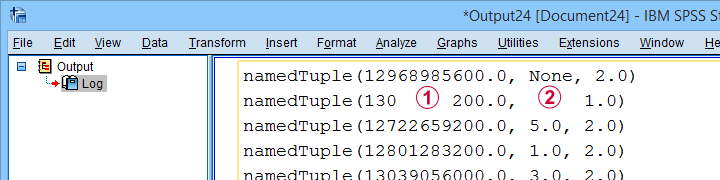
By default, SPSS date variables are not converted to Python datetime objects. For more on this, see SPSS - Extract ISO Weeks from Date Variable.
Missing values in SPSS result in Python NoneType objects.
Python os Module
The Python os (short for operating system - probably MS Windows for most readers) module allows us to look up the contents of folders and move files to different folder and/or rename them. The table below lists some functions.
| Module | Component | Example | Description |
|---|---|---|---|
| os | listdir | os.listdir(r'd:\data') | Return Python list of all files and folders in some directory. |
| os | path.exists | os.path.exists(r'd:\data\myfile.sav') | Check if path exists. |
| os | path.join | os.path.join(dir,'myfile.sav') | Create path from components such as (sub)folders and file name. |
| os | remove | os.remove(r'd:\data\myfile.sav') | Delete file. |
| os | rename | os.rename(r'd:\temp',r'd:\tmp') | Change file/folder name or location. |
| os | walk | os.walk(r'd:\data') | Search folder and all subfolders. |
Note that we often use raw strings for escaping the backslashes found in Windows paths. We'll use os.listdir in some future tutorials.
Python SpssClient Module
The SpssClient module works quite differently than the other SPSS Python modules. We mostly use it for (batch) processing SPSS output items such as tables and charts.
Most of what we used to do with the SpssClient module has been added to OUTPUT MODIFY for recent SPSS versions. This works way easier, faster and more reliably.
On top of that, the SpssClient module is rather challenging. We therefore decided not to cover it any further during this course.
Thanks for reading!
Quick Overview Python Object Types
In our examples, you'll encounter terms such as a Python list or dict object. So which object types do we find in Python and what are their basic properties? The table below presents a quick overview.
Quick Overview Python Object Types
| Type | Meaning | Iterable? | Mutable? | Looks like | What is it? |
|---|---|---|---|---|---|
| str | String | Yes | No | apple | Sequence of 0 or more characters |
| list | List | Yes | Yes | [1,2,3] | Sequence of objects that are referenced by their positions |
| tuple | Python tuple | Yes | No | ('apple','banana') | Sequence of objects that are referenced by their positions |
| dict | Dictionary | Yes | Yes | {1:'apple',2:'banana'} | Unordered set of (unique) keys, each of which has some value |
| int | Integer number | No | No | 1 | Number that has no decimal places |
| float | Floating point number | No | No | 1.0 | Number that has decimal places |
| function | Python function | No | No | def myfunction(): | Named amount of code that takes zero or more arguments and executes something |
| module | Python module | No | No | (Text file with .py extension) | One or more Python files that define functions and/or other objects. |
| bool | Boolean | No | No | True / False | Object that can only indicate True or False |
| range | Python range | Yes | No | range(0, 10) | Sequence of integer numbers |
| NoneType | Empty object | No | No | None | Empty object without type |
What Does “Iterable” Mean in Python?
Python objects are iterable if you can loop over them. For instance, you can loop over (the characters contained in) a Python string object. However, you can't loop over a Python int object.
Whether you can (not) loop over an object only depends on the type of object, not its contents. Like so, you can loop over an empty list as shown below.
begin program python3.
myString = '13579'
for char in myString:
print(char)
end program.
*INT OBJECT IS NOT ITERABLE.
begin program python3.
myInt = 13579
for char in myInt:
print(char) # TypeError: 'int' object is not iterable
end program.
*PYTHON LIST IS ITERABLE, EVEN IF EMPTY.
begin program python3.
myList = []
for elem in myList:
print(elem)
end program.
What Does “Mutable” Mean in Python?
Python objects are mutable if their values can be changed. Confusingly, it seems you can change the value of, for instance, a string object. Doing so, however, simply creates an entirely new string object with the same name but a (possibly) different value than the original string object.
The examples below demonstrate this by inspecting the Python IDs before and after modifying some string object.
begin program python3.
myString = 'apple'
print(myString) # apple
print(id(myString)) # 51135968
myString += 's'
print(myString) # apples
print(id(myString)) # 51043720
end program.
*CHANGING ELEMENTS OF LIST OBJECT DOES NOT RESULT IN NEW LIST OBJECT.
begin program python3.
myList = ['apple','banana','cherry']
print(myList) # ['apple', 'banana', 'cherry']
print(id(myList)) # 45378824
myList.append('durian')
print(myList) # ['apple', 'banana', 'cherry', 'durian']
print(id(myList)) # 45378824
end program.
Python String Object
A Python string simply consists of 0 or (usually) more characters. For a detailed overview of Python string methods, read up on Overview Python String Methods. The syntax below demonstrates some minimal basics.
begin program python3.
myString = 'apple'
print(type(myString)) # <type 'str'>
print(myString) # apple
end program.
*RETRIEVE LAST ELEMENT (CHARACTER) FROM STRING.
begin program python3.
print(myString[-1]) # e
end program.
Why are Python string objects so important? Well, a main goal of using Python in SPSS is creating (large amounts of) SPSS syntax to accomplish several tasks. Such syntax is created as one or many Python string objects which are then passed on to be run in SPSS.
Python List Object
Python list objects consist of 0 or (usually) more elements separated by commas and enclosed by square brackets.
begin program python3.
myList = ['apple','banana','cherry']
print(type(myList)) # <class 'list'>
print(myList) # ['apple','banana','cherry']
end program.
*RETRIEVE ITEM FROM LIST BY INDEX.
begin program python3.
print(myList[0]) # apple
end program.
List objects are similar to tuples except that they are editable (“mutable”). As a consequence, many methods are available for lists. We may present a quick overview of those in a future tutorial.
Python Tuple Object
Python tuples consist of 0 or more elements enclosed by parentheses and separated by commas. The syntax below demonstrates a handful of basics.
begin program python3.
myTuple = ('apple','banana','cherry')
print(type(myTuple)) # <class 'tuple'>
print(myTuple) # ('apple','banana','cherry')
end program.
*EXTRACT LAST ELEMENT FROM TUPLE.
begin program python3.
print(myTuple[-1]) # cherry
end program.
Python tuples are similar to Python list objects, except that they are not editable (“immutable”). We usually just extract elements from them with square brackets.
Python Dictionary Object
A Python dict object consists of 0 or (usually) more key-value pairs. Value can only be retrieved from their keys, not from any indices as shown below.
Python dict keys (but not values) must be unique. Both keys and values are usually Python string or integer objects but they can technically be any type including
- lists;
- tuples;
- dictionaries;
- or any other Python object.
The syntax below demonstrates a handful of Python dict basics.
begin program python3.
myDict = {'a':'apple','b':'banana','c':'cherry'}
print(type(myDict)) # <class 'dict'>
print(myDict) # {'b': 'banana', 'a': 'apple', 'c': 'cherry'}
end program.
*RETRIEVE DICT VALUE FROM DICT KEY.
begin program python3.
print(myDict['a']) # apple
end program.
*NOTE: YOU CAN'T RETRIEVE DICT VALUE FROM INDEX.
begin program python3.
print(myDict[0]) # ... KeyError ...
end program.
*LOOP OVER DICT KEYS AND VALUES.
begin program python3.
for key,value in myDict.items():
print(key,value)
end program.
Python Integer Object
An “int” in Python indicates an integer number: a number without decimal places.
begin program python3.
myInt = 5
print(type(myInt)) # <class 'int'>
print(myInt) # 5
end program.
*NOTE THAT / OPERATOR INDICATES DIVISION FOR INT / FLOAT.
begin program python3.
print(myInt / 2)
end program.
Note that a number with decimal places is a float or a decimal in Python.
Python Float Object
Numbers with decimal places are floats or decimals in Python. The syntax below demonstrates a handful of basics.
begin program python3.
myFloat = 3.0
print(type(myFloat)) # <class 'float'>
print(myFloat) # 3.0
end program.
*FOR FLOAT, + OPERATOR INDICATES NUMERIC ADDITION.
begin program python3.
print(myFloat + 1) # 1.5
end program.
Floats in Python are single-precision floating point numbers. In contrast, all numbers in SPSS are double-precision floating-point numbers.
Python Functions
A function in Python consists of 1 or more lines of Python code. These typically accomplish a general task that is needed in several different situations. A minimal example is shown below.
begin program python3.
def myFunction(myName = 'Ruben'):
print('Hello! My name is {}'.format(myName))
end program.
*INSPECT FUNCTION.
begin program python3.
print(type(myFunction)) # <class 'function'>
print(myFunction) # <function myFunction at 0x00000000030A3978>
end program.
*RUN FUNCTION WITH(OUT) ARGUMENT.
begin program python3.
myFunction() # Hello! My name is Ruben
myFunction(myName = 'Chrissy') # Hello! My name is Chrissy
end program.
Note that this function takes at most 1 argument: myName. If no argument is passed, it defaults to “Ruben”.
In Python and other programming languages, functions are very useful to make code shorter and more manageable: we basically break up a large amount of code into tiny building blocks that we can adjust and correct separately of the others.
A lesson in which we'll define and use Python functions is SPSS - Cloning Variables with Python.
Python Modules
A Python module basically consists of one or more text files containing Python code with the .py extension.
begin program python3.
import os
print(type(os)) # <class 'module'>
print(os) # <module 'os' from 'C:\\Program Files\\IBM\\SPSS\\Statistics\\Python3\\lib\\os.py'>
end program.
Python modules typically define classes and functions that are related to specific tasks such as
- working with regular expressions (Python re module);
- interacting with Excel files (openpyxl module);
- creating, moving, copying or deleting files and/or folders (Python os module).
We'll create some very simple SPSS Python modules in SPSS - Cloning Variables with Python.
Python Boolean Object
Boolean objects are simply True or False. They're used to specify if you want some task to be performed or not. Also, conditions implicitly result in Booleans (True if they're met, False otherwise).
begin program python3.
myBoolean = True
print(type(myBoolean)) # <class 'bool'>
print(myBoolean) # True
end program.
*USE BOOLEAN IN IF STATEMENT.
begin program python3.
if myBoolean:
print('Yes!')
else:
print('No!')
end program.
*IMPLICIT BOOLEAN IN IF STATEMENT.
begin program python3.
if 'a' in 'banana':
print('Yes!')
else:
print('No!')
end program.
*USE BOOLEAN AS FUNCTION ARGUMENT.
begin program python3.
myList = [5,2,8,1,9]
print(sorted(myList,reverse = True)) # [9, 8, 5, 2, 1]
end program.
Python Range Object
A Python range object creates a series of consecutive integers when looped over. Note that range(10) results in 0 through 9. For 1 through 10, use range(1,11).
begin program python3.
myRange = range(10)
print(type(myRange)) #<class 'range'>
print(myRange) # range(0, 10)
end program.
*LOOP OVER NUMBERS 1 - 10.
begin program python3.
for myInt in range(1,11):
print(myInt)
end program.
Python NoneType Object
A NoneType object in Python indicates an empty object that has been declared but does not have any value (yet).
begin program python3.
myNone = None
print(type(myNone)) # <class 'NoneType'>
print(myNone) # None
end program.
When reading SPSS data values with the spssdata module, missing values usually result in NoneType objects in Python. Also, optional arguments sometimes have None as their default in Python functions.
Final Notes
So much for my basic overview of Python object types. Did I miss anything? Did you find it helpful? Help me out and let me know.
Thanks for reading!
Python Operators – Quick Overview & Examples
The table below presents a quick overview of all Python operators.
Some basic examples for some operators very specific to Python are found below this overview.
| OPERATOR | LOOKS LIKE | FUNCTION | EXAMPLES |
|---|---|---|---|
| Is | = | Assigns value to object | myString = 'Ruben' |
| Equal to | == | Compares if values are equal | if myString == 'Chrissy': |
| Not equal to | != | Compares if values are not equal | if myString != 'Ruben': |
| Less than | < | Compares if value is less than | if myAge < 30: |
| Less than or equal to | <= | Compares if value is less than or equal to | if myAge <= 30: |
| Greater than | > | Compares if value is greater than | if myAge > 30: |
| Greater than or equal to | >= | Compares if value is greater than or equal to | if myAge >= 30: |
| Identity equal | is | Checks if objects have equal IDs | if myAge is None: |
| Identity not equal | is not | Checks if objects have different IDs | if myAge is not None: |
| In | in | Checks if object contains other object | if 'a' in 'banana': |
| And | and | Checks if 2 conditions are both True | if 'a' in 'banana' and 'c' in 'cherry': |
| Or | or | Checks if at least 1 of multiple conditions is True | if 'a' in 'banana' or 'b' in 'cherry': |
| Not | not | Checks if condition is False | if not 'c' in 'banana': |
| Backslash | \ | Escape (special or normal) character | print('new line starts\nhere') |
| Hash | # | Indicates that rest of line if comment | #LOOP OVER VARIABLES STARTS HERE |
| Square brackets | [] | Extracts part of object such as substring Indicates Python list object | myString = 'Ruben'[0] |
| Parentheses | () | Combines conditions Indicates Python tuple | if ('a' in 'banana' or 'b' in 'banana') and 'd' in 'cherry': |
| Curly brackets | {} | Placeholder for Python text replacement Indicates Python dict object | 'Just say {}!'.format('hello') |
| Plus | + | Add 2 or more numbers Add element to object such as concatenation | fullName = 'Ruben' + ' van den Berg' |
| Minus | - | Subtraction for numbers | 10 - 9 |
| Asterisk | * | Multiplication for numbers | 10 * 9 |
| Slash | / | Division for numbers | 10 / 2 |
| Double asterisk | ** | Power for numbers | 2 ** 10 |
| Double slash | // | Floor division for numbers | 3 // 2 |
| Percent | % | Modulus for numbers Text replacement in strings | 3 % 2 |
| Plus-is | += | Add number to existing number Add element to object such as concatenation | cntr += 1 |
Python “Less Than” Operator
A minor note regarding the Python <, <=, > and >= operators is that they also apply to strings. In this case, they roughly refer to the alphabetical order of those strings.
print('a' < 'b') # True
print('a' > 'b') # False
end program.
More precisely, the aforementioned operators compare if Unicode code points underlying characters are smaller/larger. This is why capital letters are always smaller than their lower case counterparts.
print('a' < 'A') ## False
print('a' > 'A') ## True
end program.
Most (but not all) special characters precede all numbers, which precede all letters.
print('#' < '5') # True
print('5' < 'Z') # True
end program.
Python “Is” Operator
In Python, “is” evaluates if 2 objects share the same ID. When comparing Python objects, we usually compare if their values are equal. A stricter comparison, however, is whether their IDs are equal too. The syntax below shows a quick example.
begin program python3.
myName = 'Ruben'
yourName = 'Rube'
yourName += 'n'
print(myName,yourName) # Ruben Ruben
print(myName == yourName) # True
print(id(myName),id(yourName)) # 51019032 51016008
print(myName is yourName) # False
end program.
If 2 objects have the same ID, then they are basically just different names for the same object. In this case, a change to one of them applies to the other as well.
begin program python3.
myList = [1,3,5]
yourList = myList
print(myList is yourList) # True
myList.append(7) # Applies to 'both' lists
print(myList,yourList) # [1, 3, 5, 7] [1, 3, 5, 7]
end program.
*CREATE 2 LIST OBJECTS WITH DIFFERENT IDS.
begin program python3.
myList = [1,3,5]
yourList = myList[:]
print(myList is yourList) # False
myList.append(7) # Applies only to myList
print(myList,yourList) # [1, 3, 5, 7] [1, 3, 5]
end program.
Python “In” Operator
The Python “in” operator evaluates if some object contains another object. Basic examples are
- does some Python string contain some substring?
- does some Python list contain some string?
- does some Python tuple contain some integer?
begin program python3.
myFruit = 'banana'
print('an' in myFruit) # True
end program.
*CHECK IF LIST CONTAINS SUBTRING.
begin program python3.
myFruit = ['apple','banana','cherry']
print('apple' in myFruit) # True
end program.
Note that the “in” operator is a bit tricky for Python dict objects: it only inspects if some object is among the dict keys, not its values.
begin program python3.
myFruit = {'a':'apple','b':'banana','c':'cherry'}
print('a' in myFruit) # True
print('apple' in myFruit) # False
end program.
*USE "VALUES" METHOD FOR SEARCHING DICT VALUES.
begin program python3.
print('apple' in myFruit.values()) # True
end program.
Backslashes in Python
In Python, a backslash indicates an escape sequence: a combination of 2 characters where the first modifies the meaning of the second. This works in 2 directions:
- a backslash gives a special meaning to “normal” characters and
- a backslash abolishes the special meaning of special characters.
A common example of the first type is \n, in which the backslash changes the meaning of the n from simply “n” to a line break.
print('New line starts\nhere')
end program.
An example of the second type is \', in which the backslash changes the special meaning of ' (start of a string) to simply “'”.
print('I don\'t know!') # I don't know!
end program.
For specifying paths in Python (especially when using the os module), we often need to escape the backslash itself. We do so by either using 2 backslashes or by specifying a path as a raw string by preceding it with “r”.
begin program python3.
myPath = 'D:\\SCRIPTS\\NEW FOLDER'
print(myPath) # D:\SCRIPTS\NEW FOLDER
end program.
*ESCAPE BACKSLASHES BY RAW STRING.
begin program python3.
yourPath = r'D:\SCRIPTS\NEW FOLDER'
print(yourPath) # D:\SCRIPTS\NEW FOLDER
end program.
Square Brackets in Python
In Python, square brackets either
- extract a part from some object such as a substring or
- indicate a Python list object.
The syntax below gives a handful of examples for extracting elements from objects, a procedure known as “slicing” in Python.
begin program python3.
myName = 'Ruben Geert van den Berg'
print(myName[:5]) # Ruben
end program.
*EXTRACT LAST ELEMENT FROM TUPLE.
begin program python3.
myTuple = (1,3,5,7,9)
print(myTuple[-1]) # 9
end program.
*EXTRACT DICT VALUE FOR KEY = 'a'.
begin program python3.
myFruit = {'a':'apple','b':'banana','c':'cherry'}
print(myFruit['a']) # apple
end program.
Square brackets around zero or more objects tell you that these make up a Python list object.
begin program python3.
animals = []
print(type(animals)) # <class 'list'>
end program.
begin program python3.
print(animals) # [] tells you that animals is a list object
end program.
Parentheses in Python
In Python, parentheses either
- group 2 or more conditions or
- indicate a Python tuple.
As the examples below suggest, it may be a good idea to always use parentheses for combining 3 or more conditions using “and” and “or” operators.
begin program python3.
if ('a' in 'banana' or 'b' in 'banana') and 'd' in 'cherry':
print('Yes!')
else:
print('No!')
end program.
*FIRST CONDITION MUST BE TRUE.
begin program python3.
if 'a' in 'banana' or ('b' in 'banana' and 'd' in 'cherry'):
print('Yes!')
else:
print('No!')
end program.
*UNCLEAR HOW CONDITIONS COMBINE...
begin program python3.
if 'a' in 'banana' or 'b' in 'banana' and 'd' in 'cherry':
print('Yes!')
else:
print('No!')
end program.
Curly Brackets in Python
In Python, curly brackets either
- make up a placeholder for a text replacement or
- indicate a Python dict object.
We'll cover different options for text replacements in SPSS Python Text Replacement Tutorial but we'll also add a minimal example below.
begin program python3.
myGreeting = 'hello'
print('Just say {}!'.format(myGreeting))
end program.
The examples below demonstrate that curly brackets also indicate a Python dict object.
begin program python3.
myFruit = {'a':'apple','b':'banana','c':'cherry'}
print(myFruit) # {'c': 'cherry', 'b': 'banana', 'a': 'apple'}
print(type(myFruit)) # <class 'dict'>
end program.
Python Plus Operator
In Python, the plus operator either
- adds 2 or more numbers (such as int or float objects) or
- adds 1 or more elements to an object.
The example below demonstrates numeric addition.
begin program python3.
myInt = 5
myFloat = 1.23
print(myInt + myFloat) # 6.23
end program.
For objects other than numbers -such as strings or lists- the plus operator adds elements to them. Like so, the examples below demonstrate a concatenation for a string object and adding a list to another list.
begin program python3.
myDay = '23'
myMonth = 'February'
myYear = '2022'
myDate = myDay + ' ' + myMonth + ' ' + myYear
print(myDate) # 23 February 2022
end program.
*ADD LIST TO LIST WITH +. NOTE: USE += FOR CHANGING MYLIST.
begin program python3.
myList = [1,3,5]
print(myList + [7,9,11])
end program.
*ADD LIST TO LIST WITH EXTEND.
begin program python3.
myList = [1,3,5]
myList.extend([7,9,11])
print(myList)
end program.
Double Asterisk in Python
A double asterisk in Python raises some number to some power.
begin program python3.
for pow in range(10):
print(2 ** pow)
end program.
Quick note: you can use something like myNumber**(1 / k) for finding the k-th root for some number, including the square root. In contrast to Excel, Googlesheet and SPSS, sqrt() is not available in Python unless you import the math module and use math.sqrt().
Double Slash in Python
A double slash in Python is used for floor division: it divides x by y and truncates the result.
begin program python3.
print(10 // 3) # 3
end program.
Percent Signs in Python
In Python, a percent sign is either used
- for the modulo function for numbers or
- as a placeholder for a text replacement in string objects.
First off, the modulo (not to be confused with modulus) returns the remainder after subtracting x from y as many times as possible. Like so, it can be used to check if numbers are odd or even.
begin program python3.
for myInt in range(10):
if (myInt % 2): # SHORTHAND FOR MODULO NOT ZERO
print('%s is an odd number.'%myInt)
else:
print('%s is an even number.'%myInt)
end program.
Second, percent signs are used as placeholders for text replacements in Python. Precisely,
- %s can be replaced by a string value,
- %d can be replaced by an integer number and
- %f can be replaced by a floating point number.
Note that these placeholders are somewhat deprecated over curly brackets with .format(). The syntax below shows minimal examples for both methods.
begin program python3.
name = 'Alexander'
age = 43
print('%s is %d years old.'%(name,age)) # Alexander is 43 years old.
end program.
*TEXT REPLACEMENTS WITH {} PLACEHOLDERS.
begin program python3.
name = 'Alexander'
age = 43
print('{} is {} years old.'.format(name,age)) # Alexander is 43 years old.
end program.
Python Plus-Is Operator
In Python, the plus-is operator is used for
- adding a number to another number or
- adding an element to some other object.
In either case, a += b is nothing more than a shorthand for a = a + b. The syntax below gives a quick example for numeric objects.
begin program python3.
myInt = 5
myInt = myInt + 3
print(myInt) # 8
end program.
*ADD 3 TO MYINTO VIA PLUS-IS OPERATOR.
begin program python3.
myInt = 5
myInt += 3
print(myInt) # 8
end program.
Apart from numeric addition, the += operator can also be used for concatenating strings or adding elements to Python list objects. In the latter case, it acts as .extend rather than .append as shown below.
begin program python3.
myVars = ''
for ind in range(10):
myVars += 'v%s '%ind
print(myVars) # ['v0', 'v1', 'v2', 'v3', 'v4', 'v5', 'v6', 'v7', 'v8', 'v9']
end program.
*FOR LIST, += OPERATOR IS SIMILAR TO EXTEND (NOT APPEND).
begin program python3.
myVars = []
for ind in range(10):
myVars += ['v' + str(ind)]
print(myVars) # v0 v1 v2 v3 v4 v5 v6 v7 v8 v9
end program.
Right, so I guess that should do regarding Python operators. If you've any questions or remarks, please let us know.
Thanks for reading!