 SPSS TUTORIALS
Also see SPSS Moderation Regression Tutorial.
- Regression with Moderation Effect
- Downloading and Installing the Mean Centering Tool
- Using the Mean Centering Tool
- Mean Centering Tool - Results
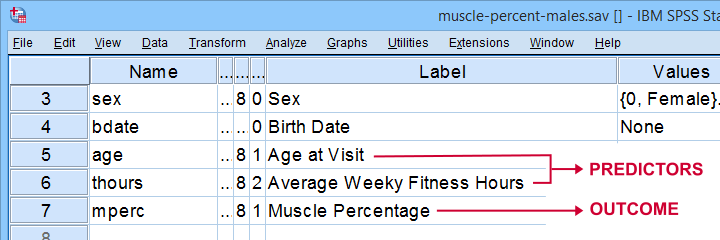
A sports doctor wants to know if and how training and age relate to body muscle percentage. His data on 243 male patients are in muscle-percent-males.sav, part of which is shown below.
Regression with Moderation Effect
The basic way to go with these data is to run multiple regression with age and training hours as predictors. However, our doctor expects a moderation interaction effect between age and training. Precisely, he believes that the effect of training on muscle percentage diminishes with age. The diagram below illustrates the basic idea.
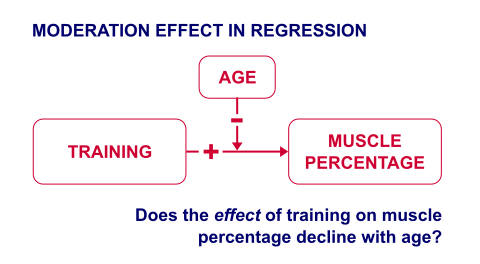
The moderation effect can be tested by creating a new variable that represents this interaction effect. We'll do just that in 3 steps:
- mean center both predictors: subtract the variable means from all individual scores. This results in centered predictors having zero means.
- compute the interaction predictor as the product of the mean centered predictors;
- run a multiple regression analysis with 3 predictors: the mean centered predictors and the interaction predictor.
Steps 1 and 2 can be done with basic syntax as covered in How to Mean Center Predictors in SPSS? However, we'll present a simple tool below that does these steps for you.
Downloading and Installing the Mean Centering Tool
First off, you need SPSS with the SPSS-Python-Essentials for installing this tool. The tool is downloadable from SPSS_TUTORIALS_MEAN_CENTER.spe.
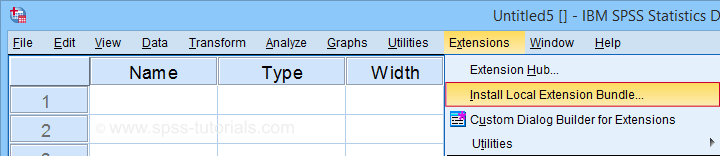
After downloading it, open SPSS and navigate to
 as shown below.
For older SPSS versions, try
You may need to run SPSS as an administrator (by right-clicking its desktop shortcut) in order to install any tools.
Using the Mean Centering Tool
First open some data such as muscle-percent-males.sav. After installing the mean centering tool, you'll find it in the menu.

This opens a dialog as shown below. Note that string variables don't show up here: these need to be converted to numeric variable before they can be mean centered.
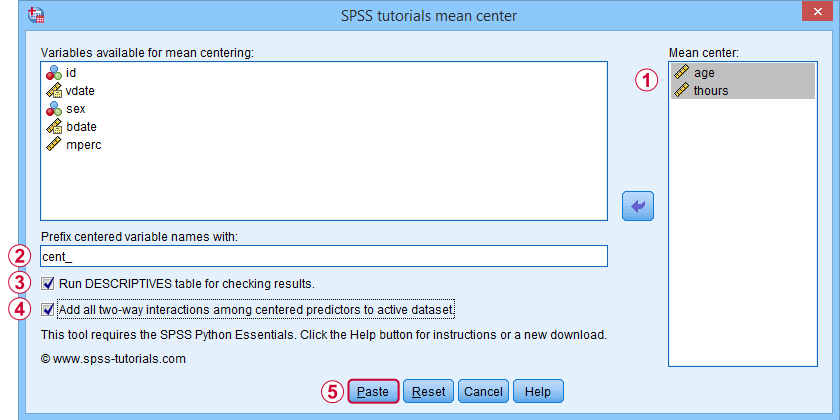
 Variable names for the centered predictors consist of a prefix + the original variable names. In this example, mean centered age and thours will be named cent_age and cent_thours.
 Optionally, create new variables holding all 2-way interaction effects among the centered predictors. For 2 predictors, this results in only 1 interaction predictor.
 Clicking results in the syntax below. Let's run it.
SPSS_TUTORIALS_MEAN_CENTER VARIABLES = "age thours"
/OPTIONS PREFIX = cent_ CHECKTABLE INTERACTIONS.
Mean Centering Tool - Results
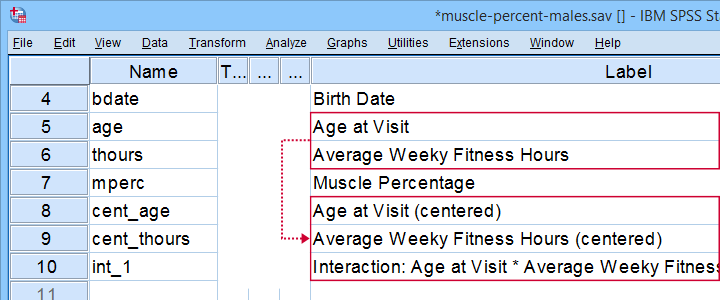
In variable view, note that 3 new variables have been created (and labeled). Precisely these 3 variables should be entered as predictors into our regression model.
If a checktable was requested, you'll find a basic Descriptive Statistics table in the output window.
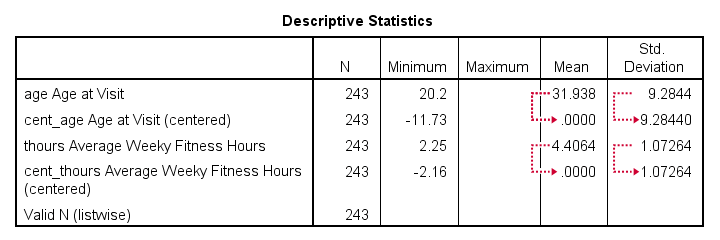
Note that the mean centered predictors have exactly zero means. Their standard deviations, however, are left unaltered by the mean centering -which is precisely how this procedure differs from computing z-scores.
Right, so that'll do for our mean centering tool. We'll cover a regression analysis with a moderation interaction effect in 1 or 2 weeks or so.
Thanks for reading!
THIS TUTORIAL HAS 40 COMMENTS:
By Ruben Geert van den Berg on February 4th, 2015
I rewrote the syntax from scratch. In the new version, the prefix is mandatory but you don't want to overwrite your variables anyway. It detects and excludes any string variables that are specified so that's a big plus. Hope you like it.
By Stephanie on February 4th, 2015
It's working!!! Thank you so much!!
By Stephanie Van Horn on February 24th, 2015
I am running SPSS 21 and when I try to run the mean centering syntax I get the following error:
>Error # 6890. Command name: begin program
>Configuration file spssdxcfg.ini is invalid.
>Execution of this command stops.
Configration file spssdxcfg.ini is invalid because the LIB_NAME is NULL.
Any help would be much appreciated! Thank you!
By Frank Webster on February 24th, 2015
What I am doing wrong? I can't get the custom dialog box to show the procedure. I have installed Python 2.7. I feel pretty stupid because nothing that I am reading is directing me toward this simple procedure. The truth is that I can write the syntax to construct the centered variables myself, I just wanted to try the program, but I can't even find it. What is a person to do?
By Ruben Geert van den Berg on February 24th, 2015
@Stephanie: the error message very much sounds as if Python is not running properly in SPSS. Did you run a tiny Python test program (such as the one proposed here succesfully yet?