 SPSS TUTORIALS
One-Sample T-Test – Quick Tutorial & Example
A one-sample t-test evaluates if a population mean
is likely to be x: some hypothesized value.
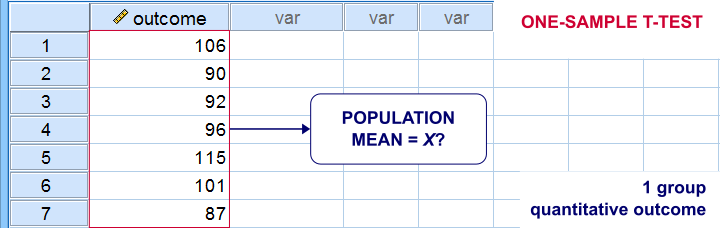
One-Sample T-Test Example
A school director thinks his students perform poorly due to low IQ scores. Now, most IQ tests have been calibrated to have a mean of 100 points in the general population. So the question is does the student population have a mean IQ score of 100? Now, our school has 1,114 students and the IQ tests are somewhat costly to administer. Our director therefore draws a simple random sample of N = 38 students and tests them on 4 IQ components:
- verb (Verbal Intelligence )
- math (Mathematical Ability )
- clas (Classification Skills )
- logi (Logical Reasoning Skills)
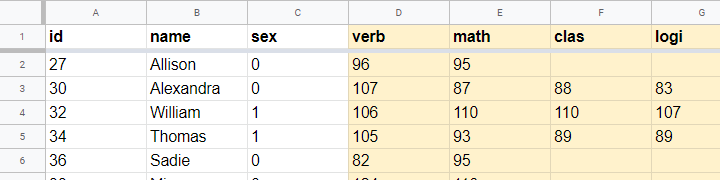
The raw data thus collected are in this Googlesheet, partly shown below. Note that a couple of scores are missing due to illness and unknown reasons.
Null Hypothesis
We'll try to demonstrate that our students have low IQ scores by rejecting the null hypothesis that the mean IQ score for the entire student population is 100 for each of the 4 IQ components measured. Our main challenge is that we only have data on a sample of 38 students from a population of N = 1,114. But let's first just look at some descriptive statistics for each component:
- N - sample size;
- M - sample mean and
- SD - sample standard deviation.
Descriptive Statistics
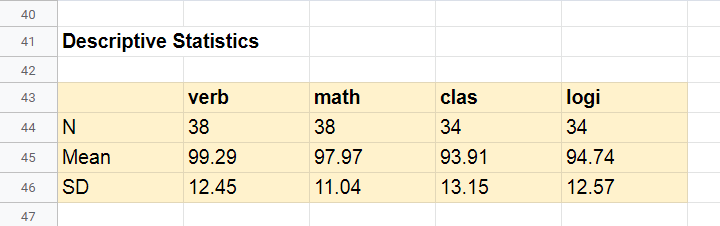
Our first basic conclusion is that our 38 students score lower than 100 points on all 4 IQ components. The differences for verb (99.29) and math (97.97) are small. Those for clas (93.91) and logi (94.74) seem somewhat more serious.
Now, our sample of 38 students may obviously come up with slightly different means than our population of N = 1,114. So
what can we (not) conclude regarding our population?
We'll try to generalize these sample results to our population with 2 different approaches:
- Statistical significance: how likely are these sample means if the population means are really all 100 points?
- Confidence intervals: given the sample results, what are likely ranges for the population means?
Both approaches require some assumptions so let's first look into those.
Assumptions
The assumptions required for our one-sample t-tests are
- independent observations and
- normality: the IQ scores must be normally distributed in the entire population.
Do our data meet these assumptions? First off,
1. our students didn't interact during their tests. Therefore, our observations are likely to be independent.
2. Normality is only needed for small sample sizes, say N < 25 or so. For the data at hand, normality is no issue. For smaller sample sizes, you could evaluate the normality assumption by
- inspecting if the histograms roughly follow normal curves,
- inspecting if both skewness and kurtosis are close to 0 and
- running a Shapiro-Wilk test or a Kolmogorov-Smirnov test.
However, the data at hand meet all assumptions so let's now look into the actual tests.
Formulas
If we'd draw many samples of students, such samples would come up with different means. We can compute the standard deviation of those means over hypothesized samples: the standard error of the mean or \(SE_{mean}\)
$$SE_{mean} = \frac{SD}{\sqrt{N}}$$
for our first IQ component, this results in
$$SE_{mean} = \frac{12.45}{\sqrt{38}} = 2.02$$
Our null hypothesis is that the population mean, \(\mu_0 = 100\). If this is true, then the average sample mean should also be 100. We now basically compute the z-score for our sample mean: the test statistic \(t\)
$$t = \frac{M - \mu_0}{SE_{mean}}$$
for our first IQ component, this results in
$$t = \frac{99.29 - 100}{2.02} = -0.35$$
If the assumptions are met, \(t\) follows a t distribution with the degrees of freedom or \(df\) given by
$$df = N - 1$$
For a sample of 38 respondents, this results in
$$df = 38 - 1 = 37$$
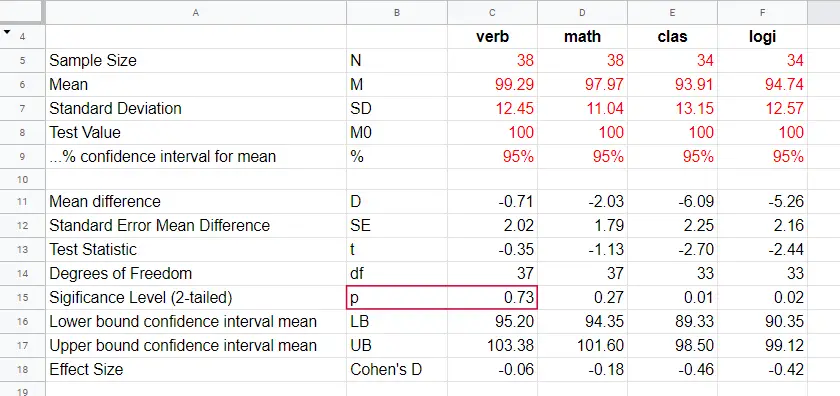
Given \(t\) and \(df\), we can simply look up that the 2-tailed significance level \(p\) = 0.73 in this Googlesheet, partly shown below.
Interpretation
As a rule of thumb, we
reject the null hypothesis if p < 0.05.
We just found that p = 0.73 so we don't reject our null hypothesis: given our sample data, the population mean being 100 is a credible statement.
So precisely what does p = 0.73 mean? Well, it means there's a 0.73 (or 73%) probability that t < -0.35 or t > 0.35. The figure below illustrates how this probability results from the sampling distribution, t(37).
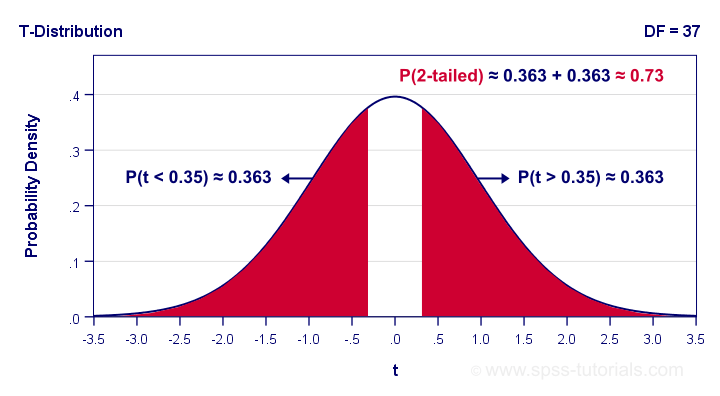
Next, remember that t is just a standardized mean difference. For our data, t = -0.35 corresponds to a difference of -0.71 IQ points. Therefore, p = 0.73 means that there's a 0.73 probability of finding an absolute mean difference of at least 0.71 points. Roughly speaking,
the sample mean we found is likely to occur
if the null hypothesis is true.
Effect Size
The only effect size measure for a one-sample t-test is Cohen’s D defined as
$$Cohen's\;D = \frac{M - \mu_0}{SD}$$
For our first IQ test component, this results in
$$Cohen's\;D = \frac{99.29 - 100}{12.45} = -0.06$$
Some general conventions are that
- | Cohen’s D | = 0.20 indicates a small effect size;
- | Cohen’s D | = 0.50 indicates a medium effect size;
- | Cohen’s D | = 0.80 indicates a large effect size.
This means that Cohen’s D = -0.06 indicates a negligible effect size for our first test component. Cohen’s D is completely absent from SPSS except for SPSS 27. However, we can easily obtain it from JASP. The JASP output below shows the effect sizes for all 4 IQ test components.
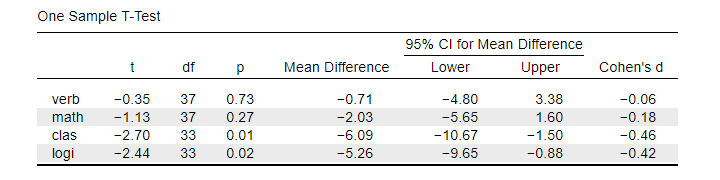
Note that the last 2 IQ components -clas and logi- almost have medium effect sizes. These are also the 2 components whose means differ significantly from 100: p < 0.05 for both means (third table column).
Confidence Intervals for Means
Our data came up with sample means for our 4 IQ test components. Now, we know that sample means typically differ somewhat from their population counterparts.
So what are likely ranges for the population means we're after?
This is often answered by computing 95% confidence intervals. We'll demonstrate the procedure for our last IQ component, logical reasoning.
Since we've 34 observations, t follows a t-distribution with df = 33. We'll first look up which t-values enclose the most likely 95% from the inverse t-distribution. We'll do so by typing
=T.INV(0.025,33)
into any cell of a Googlesheet, which returns -2.03. Note that 0.025 is 2.5%. This is because the 5% most unlikely values are divided over both tails of the distribution as shown below.
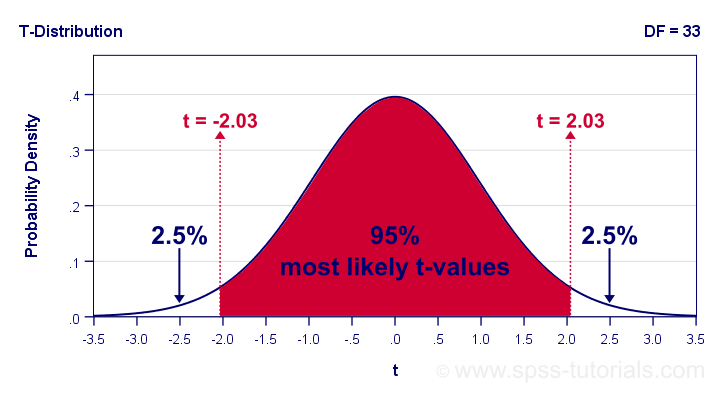
Now, our t-value of -2.03 estimates that our 95% of our sample means fluctuate between ± 2.03 standard errors denoted by \(SE_{mean}\) For our last IQ component,
$$SE_{mean} = \frac{12.57}{\sqrt34} = 2.16 $$
We now know that 95% of our sample means are estimated to fluctuate between ± 2.03 · 2.16 = 4.39 IQ test points. Last, we combine this fluctuation with our observed sample mean of 94.74:
$$CI_{95\%} = [94.74 - 4.39,94.74 + 4.39] = [90.35,99.12]$$
Note that our 95% confidence interval does not enclose our hypothesized population mean of 100. This implies that we'll reject this null hypothesis at α = 0.05. We don't even need to run the actual t-test for drawing this conclusion.
APA Style Reporting
A single t-test is usually reported in text as in
“The mean for verbal skills did not differ from 100,
t(37) = -0.35, p = 0.73, Cohen’s D = 0.06.”
For multiple tests, a simple overview table as shown below is recommended. We feel that confidence intervals for means (not mean differences) should also be included. Since the APA does not mention these, we left them out for now.
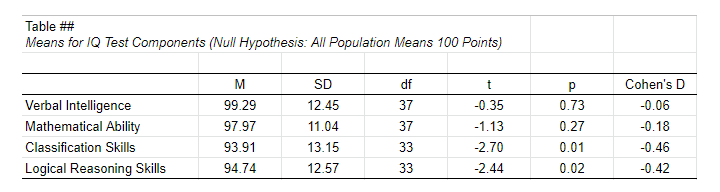 APA Style Reporting Table Example for One-Sample T-Tests
Right. Well, I can't think of anything else that is relevant regarding the one-sample t-test. If you do, don't be shy. Just write us a comment below. We're always happy to hear from you!
Thanks for reading!
SPSS One Sample T-Test Tutorial
Also see One-Sample T-Test - Quick Tutorial & Example.
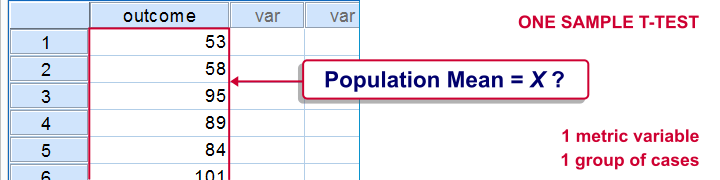
SPSS one-sample t-test tests if the mean of a single quantitative variable is equal to some hypothesized population value. The figure illustrates the basic idea.
SPSS One Sample T-Test - Example
A scientist from Greenpeace believes that herrings in the North Sea don't grow as large as they used to. It's well known that - on average - herrings should weigh 400 grams. The scientist catches and weighs 40 herrings, resulting in herrings.sav. Can we conclude from these data that the average herring weighs less than 400 grams? We'll open the data by running the syntax below.
cd 'd:downloaded'. /*or wherever data file is located.
*2. Open data.
get file 'herrings.sav'.
1. Quick Data Check
Before we run any statistical tests, we always first want to have a basic idea of what the data look like. A fast way for doing so is taking a look at the histogram for body_weight. If we generate it by using FREQUENCIES, we'll get some helpful summary statistics in our chart as well.The required syntax is so simple that we won't bother about clicking through the menu here. We added /FORMAT NOTABLE to the command in order to suppress the actual frequency table; right now, we just want a histogram and some summary statistics.
frequencies body_weight
/format notable
/histogram.
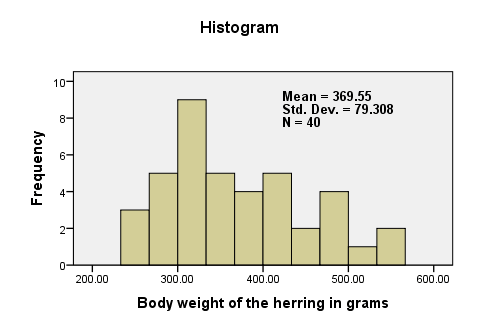
There are no very large or very small values for body_weight. The data thus look plausible. N = 40 means that the histogram is based on 40 cases (our entire sample). This tells us that there are no missing values. The mean weight is around 370 grams, which is 30 grams lower than the hypothesized 400 grams. The question is now: “if the average weight in the population is 400 grams, then what's the chance of finding a mean weight of only 370 grams in a sample of n = 40?”
2. Assumptions One Sample T-Test
Results from statistical procedures can only be taken seriously insofar as relevant assumptions are met. For a one-sample t-test, these are
- independent and identically distributed variables (or, less precisely, “independent observations”);
- normality: the test variable is normally distributed in the population;
Assumption 1 is beyond the scope of this tutorial. We assume it's been met by the data. The normality assumption not holding doesn't really affect the results for reasonable sample sizes (say, N > 30).
3. Run SPSS One-Sample T-Test
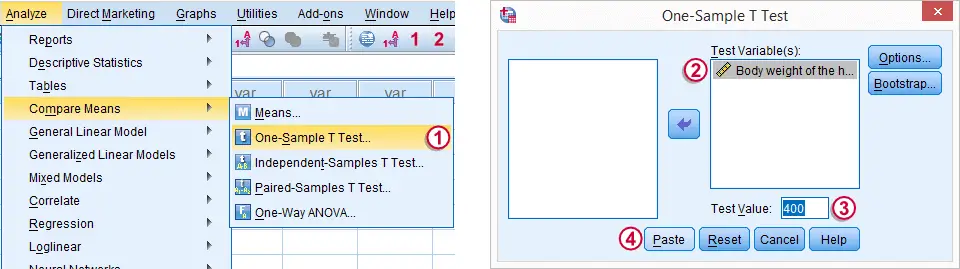
The screenshot walks you through running an SPSS one-sample t-test. Clicking results in the syntax below.
T-TEST
/TESTVAL=400
/MISSING=ANALYSIS
/VARIABLES=body_weight
/CRITERIA=CI(.95).
4. SPSS One-Sample T-Test Output

We'll first turn our attention to the One-Sample Statistics table. We already saw most of these statistics in our histogram but this table comes in a handier format for reporting these results.

The actual t-test results are found in the One-Sample Test table.
 -
-  The t value and its degrees of freedom (df) are not immediately interesting but we'll need them for reporting later on.
 The p value, denoted by “Sig. (2-tailed)” is .02; if the population mean is exactly 400 grams, then there's only a 2% chance of finding the result we did. We usually reject the null hypothesis if p < .05. We thus conclude that herrings do not weight 400 grams (but probably less than that).
It's important to notice that the p value of .02 is 2-tailed. This means that the p value consists of a 1% chance for finding a difference < -30 grams and another 1% chance for finding a difference > 30 grams.
 The Mean Difference is simply the sample mean minus the hypothesized mean (369.55 - 400 = -30.45). We could have calculated it ourselves from previously discussed results.
5. Reporting a One-Sample T-Test
Regarding descriptive statistics, the very least we should report, is the mean, standard deviation and N on which these are based. Since these statistics don't say everything about the data, we personally like to include a histogram as well. We may report the t-test results by writing “we found that, on average, herrings weighed less than 400 grams; t(39) = -2.4, p = .020.”