 SPSS TUTORIALS
Boxplots – Beginners Tutorial
A boxplot is a chart showing quartiles, outliers and
the minimum and maximum scores for 1+ variables.
Example
A sample of N = 233 people completed a speed task. The chart below shows a boxplot of their reaction times.
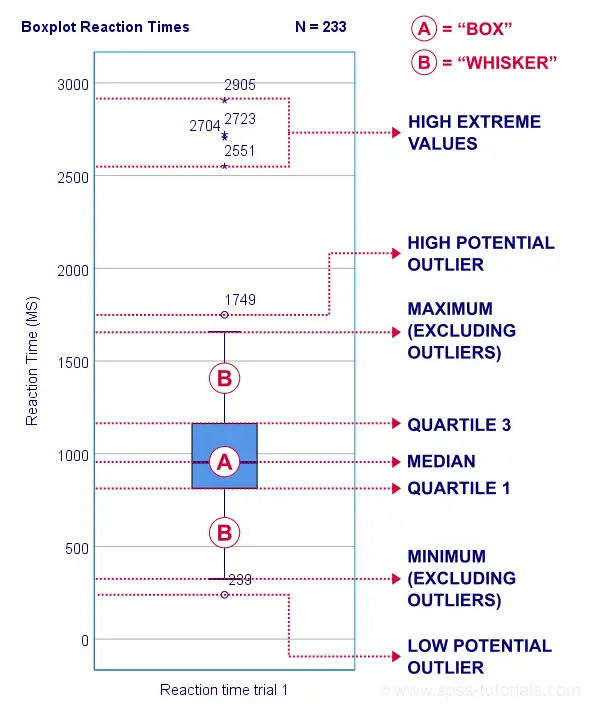
Some rough conclusions from this chart are that
- all 233 reaction times lie between 0 and 3,000 milliseconds;
- 4 scores are high extreme values. These are reaction times between 2,551 and 2,905 milliseconds;
- there's 1 high potential outlier of 1,749 milliseconds;
- the maximum reaction time (excluding potential outliers and extreme values) is around 1,650 milliseconds;
- 75% of all respondents score lower than some 1,150 milliseconds. This is the 75th percentile or quartile 3;
- 50% of all respondents score lower than some 975 milliseconds. This is the 50th percentile (the median) or quartile 2;
- 25% of all respondents score lower than some 800 milliseconds. This is the 25th percentile or quartile 1;
- the minimum reaction time (excluding potential outliers and extreme values) is around 350 milliseconds;
- there's 1 low potential outlier of 239 milliseconds;
- there aren't any low extreme values.
So what are quartiles? And how to obtain them? And how are potential outliers and extreme values defined?
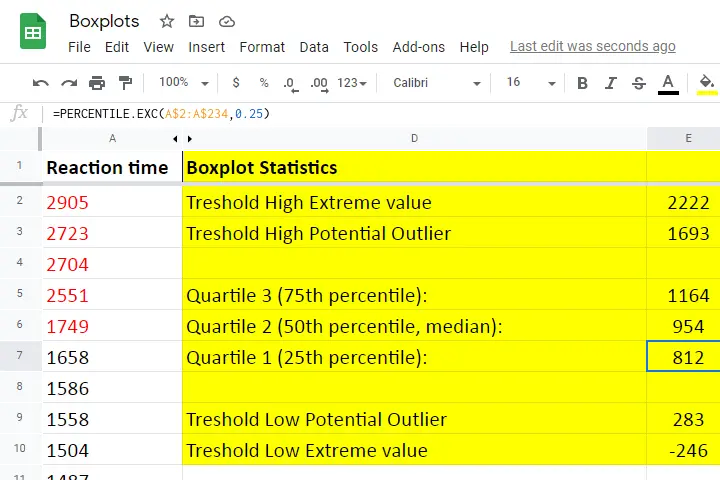
We'll show you all you need to know in this Googlesheet, part of which is shown below.
Quartile 1
Quartile 1 is the 25th percentile: it is the score that separates the lowest 25% from the highest 75% of scores. In Googlesheets and Excel, =PERCENTILE.EXC(A2:A234,0.25) returns quartile 1 for the scores in cells A2 through A234 (our 233 reaction times). The result is 811.5. This means that 25% of our scores are lower than 811.5 milliseconds. Or -reversely- 75% are higher.
A minor complication here is that 25% of N = 233 scores results in 58.25 scores. As there's no such thing as “0.25 scores”, we can't precisely separate the lowest 25% from the highest 75%.
There's no real solution to this problem but a technique known as linear interpolation probably comes closest. This is how Excel, Googlesheets and SPSS all come up with 811.5 as quartile 1 for our 233 scores.
Quartile 2
Quartile 2 -also known as the median- is the 50th percentile: the score that separates the lowest 50% from the highest 50% of scores. In Googlesheets, =PERCENTILE.EXC(A2:A234,0.50) returns quartile 2 for the scores in cells A2 through A234. For these data, that'll be 954 milliseconds.
This median is a measure of central tendency: it tells us that people typically had a reaction time of 954 milliseconds. Common measures of central tendency are
- the mean;
- the median;
- the mode.
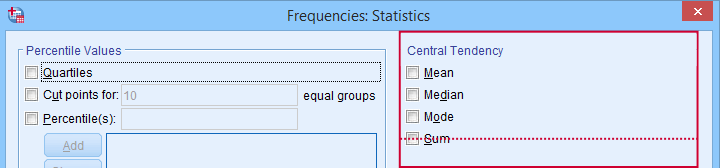 Percentiles, quartiles and measures of central tendency can be obtained from SPSS’ Frequencies dialog.
Quartile 3
Quartile 3 is the 75th percentile: the score that separates the lowest 75% from the highest 25% of scores. In Googlesheets, =PERCENTILE.EXC(A2:A234,0.75) returns quartile 3 for the scores in cells A2 through A234. For our 233 reaction times, that'll be 1,164 milliseconds.
The screenshot below shows that SPSS comes up with the exact same quartiles as Excel and Googlesheets. We'll now use quartiles 1 and 3 (811.5 and 1,164 milliseconds) for computing the interquartile range or IQR.
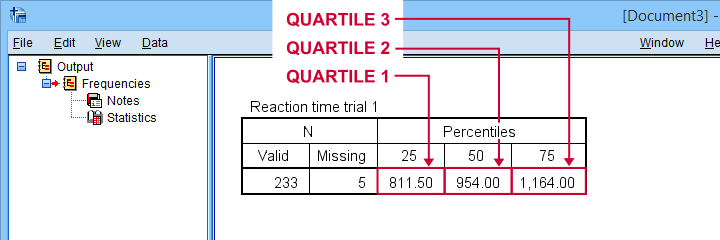 SPSS comes up with identical quartiles for our N = 233 reaction times
Interquartile Range - IQR
The interquartile range or IQR is computed as
$$IQR = quartile\;3 - quartile\;1$$
so for our data, that'll be
$$IQR = 1,164 - 811.5 = 352.5$$
The IQR is a measure of dispersion: it tells how far data points typically lie apart. Common measures of dispersion are
- the standard deviation
- the variance;
- the IQR;
- the range.
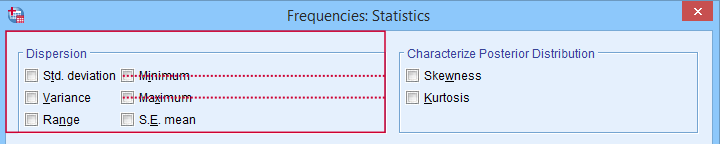 Measures of dispersion in SPSS’ Frequencies dialog.
Potential Outliers
In boxplots, potential outliers are defined as follows:
- low potential outlier: score is more than 1.5 IQR but at most 3 IQR below quartile 1;
- high potential outlier: score is more than 1.5 IQR but at most 3 IQR above quartile 3.
For our data at hand, quartile 1 = 811.5 and the IQR = 352.5. Therefore, the thresholds for low potential outliers are
- upper bound: 811.5 - 1.5 * 352.5 = 282.8;
- lower bound: 811.5 - 3 * 352.5 = -246.0.
Scores that are smaller than this lower bound are considered low extreme values: these are scores even more than 3 IQR below quartile 1.
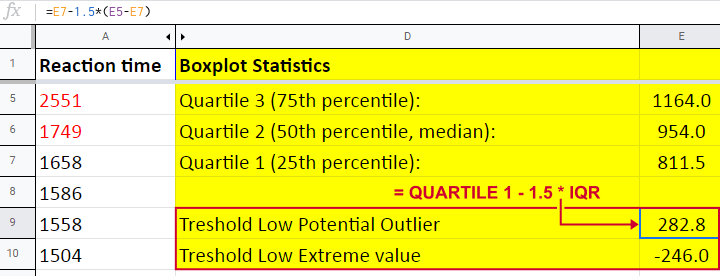
Thresholds for high potential outliers are computed in a similar fashion, using quartile 3 and the IQR. To sum things up: for our data at hand, thresholds for potential outliers are
- low potential outlier: -246 ≤ reaction time < 282.8 (milliseconds);
- high potential outlier: 1,692.8 < reaction time ≤ 2,221.5 (milliseconds).
As shown in our boxplot example, potential outliers are typically shown as circles. These either lie below the minimum or above the maximum (both excluding outliers).
A final note here is that these definitions apply only to boxplots. In other contexts, z-scores are often used to define outliers.
Extreme Values
For boxplots, extreme values are defined as follows:
- low extreme value: score is more than 3 IQR below quartile 1;
- high extreme value: score is more than 3 IQR above quartile 3.
For our 233 reaction times, this implies
- low extreme value: reaction time < -246 (milliseconds);
- high extreme value: reaction time > 2,221.5 (milliseconds).
In boxplots, extreme values are usually indicated by asterisks (*). Note that our example boxplot shows 4 high extreme values but no low extreme values.
Boxplots - Purposes
Basic purposes of boxplots are
- quick and simple data screening, especially for outliers and extreme values;
- comparing 2+ variables for 1 sample (within-subjects test);
- comparing 2+ samples on 1 variable (between-subjects test).
The figure below shows a quick boxplot comparison among 3 samples (age groups) on 1 variable (reaction time trial 3).
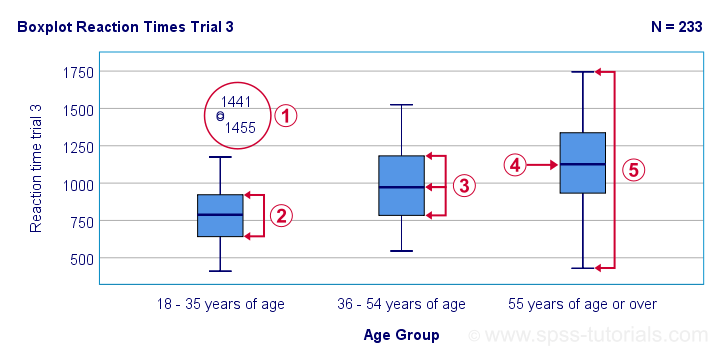
 The youngest age group has 2 potential outliers. However, they don't look too bad as they'd fall in the normal range for the other age groups.
 The young age group has the lowest “box”. This indicates that these respondents have the smallest IQR. Since the IQR ignores the bottom and top 25% of scores, this group does not necessarily have the smallest standard deviation too.
 The median lies roughly midway between quartiles 1 and 3. This suggests a roughly symmetrical frequency distribution.
 The oldest age group has the highest median reaction time and reversely. Respondents thus seem to get slower with increasing age.
 Reaction time for the oldest respondents have the largest range: the scores seem to lie further apart insofar as respondents are older.
Boxplots or Histograms?
Histograms.
The figure below illustrates why I always prefer histograms over boxplots. It's based on the exact same data as our last boxplot example.
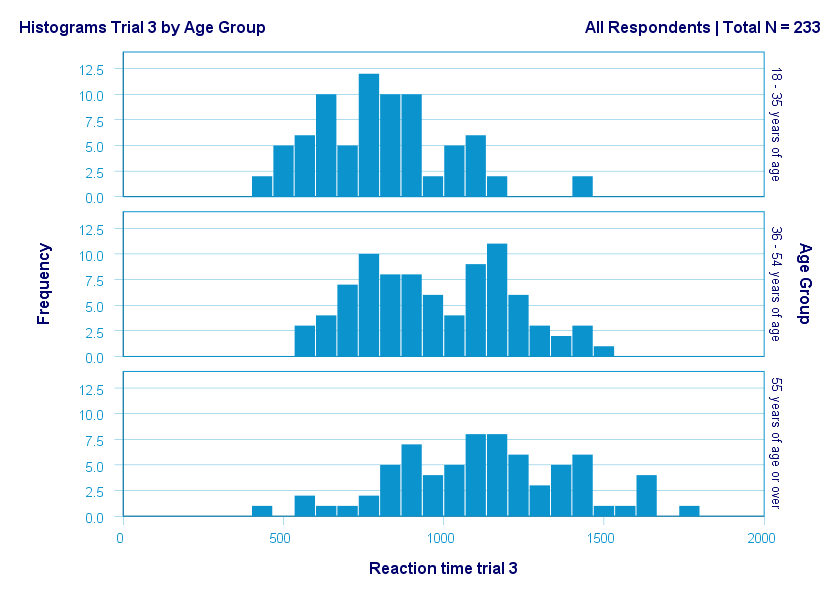
So what did the boxplot tell us that this histogram doesn't? Well, nothing really. Does it? Reversely, however, the histogram tells us that
- reaction times seem to follow a bimodal distribution for the intermediate age group;
- this distribution is therefore flattened (platykurtic) relative to a normal distribution. To some extent, this also holds for the other 2 age groups;
- means as well as standard deviations seem to increase with increasing age.
Our histograms make these points much clearer than our boxplot: in boxplots, we can't see how scores are distributed within the “box” or between the “whiskers”.
A histogram, however, allows us to roughly reconstruct our original data values. A chart simply doesn't get any more informative than that.
Agree? Disagree? Throw me a comment below and let me know what you think.
Thanks for reading!
Binomial Test – Simple Tutorial
For running a binomial test in SPSS, see SPSS Binomial Test.
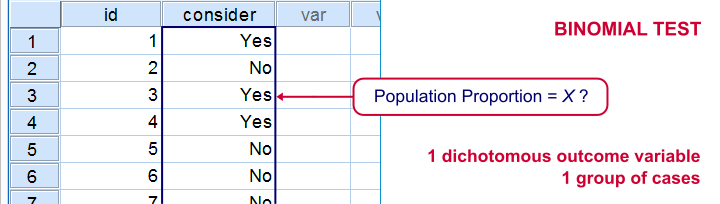
A binomial test examines if some
population proportion is likely to be x.
For example, is 50% -a proportion of 0.50- of the entire Dutch population familiar with my brand? We asked a simple random sample of N = 10 people if they are. Only 2 of those -a proportion of 0.2- or 20% know my brand. Does this sample proportion of 0.2 mean that the population proportion is not 0.5? Or is 2 out of 10 a pretty normal outcome if 50% of my population really does know my brand?
The binomial test is the simplest statistical test there is. Understanding how it works is pretty easy and will help you understand other statistical significance tests more easily too. So how does it work?
Binomial Test - Basic Idea
If the population proportion really is 0.5, we can find a sample proportion of 0.2. However, if the population proportion is only 0.1 (only 10% of all Dutch adults know the brand), then we may also find a sample proportion of 0.2. Or 0.9. Or basically any number between 0 and 1. The figure below illustrates the basic problem -I mean challenge- here.
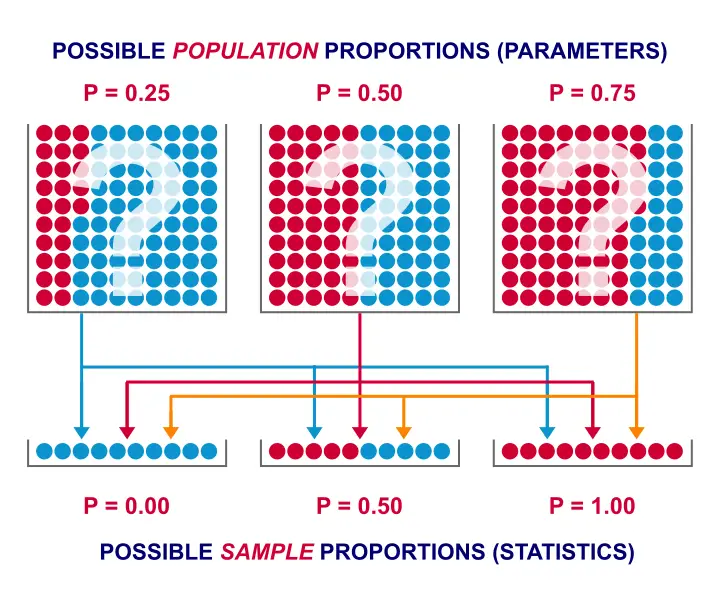 Will the real population proportion please stand up now??
So how can we conclude anything at all about our population based on just a sample? Well, we first make an initial guess about the population proportion which we call the null hypothesis: a population proportion of 0.5 knows my brand.
Given this hypothesis, many sample proportions are possible. However, some outcomes are extremely unlikely or almost impossible. If we do find an outcome that's almost impossible given some hypothesis, then the hypothesis was probably wrong: we conclude that the population proportion wasn't x after all.
So that's how we draw population conclusions based on sample outcomes. Basically all statistical tests follow this line of reasoning. The basic question for now is: what's the probability of finding 2 successes in a sample of 10 if the population proportion is 0.5?
Binomial Test Assumptions
First off, we need to assume independent observations. This basically means that the answer given by any respondent must be independent of the answer given by any other respondent. This assumption (required by almost all statistical tests) has been met by our data.
Binomial Distribution - Formula
If 50% of some population knows my brand and I ask 10 people, then my sample could hold anything between 0 and 10 successes. Each of these 11 possible outcomes and their associated probabilities are an example of a binomial distribution, which is defined as $$P(B = k) = \binom{n}{k} p^k (1 - p)^{n - k}$$ where
- \(n\) is the number of trials (sample size);
- \(k\) is the number of successes;
- \(p\) is the probability of success for a single trial or the (hypothesized) population proportion.
Note that \(\binom{n}{k}\) is a shorthand for \(\frac{n!}{k!(n - k)!}\) where \(!\) indicates a factorial.
For practical purposes, we get our probabilities straight from Google Sheets (it uses the aforementioned formula under the hood but it doesn't bother us with it).
Binomial Distribution - Chart
Right, so we got the probabilities for our 11 possible outcomes (0 through 10 successes) and visualized them below.
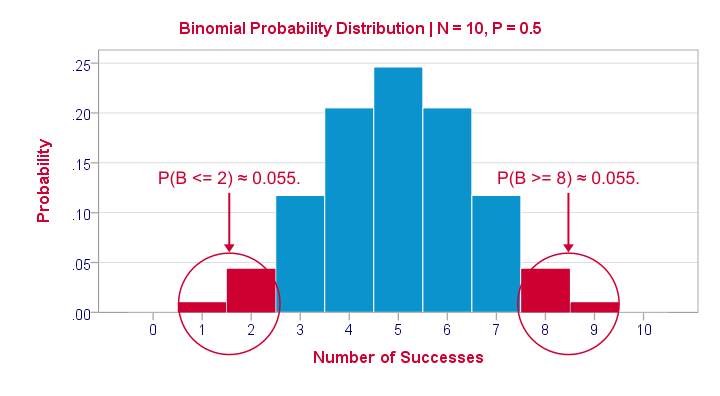
If a population proportion is 0.5 and we sample 10 observations, the most likely outcome is 5 successes: P(B = 5) ≈ 0.24. Either 4 or 6 successes are also likely outcomes (P ≈ 0.2 for each).
The probability of finding 2 or fewer successes -like we did- is 0.055. This is our one-sided p-value.
Now, very low or very high numbers of successes are both unlikely outcomes and should both cast doubt on our null hypothesis. We therefore take into account the p-value for the opposite outcome -8 or more successes- which is another 0.055. Like so, we find a 2-sided p-value of 0.11. If we would draw 1,000 samples instead of just 1, then some 11% of those should result in 2(-) or 8(+) successes when the population proportion is 0.5. Our sample outcome should occur in a reasonable percentage of samples. And since 11% is not very unlikely, our sample does not refute our hypothesis that 50% of our population knows our brand.
Binomial Test - Google Sheets
We ran our example in this simple Google Sheet. It's accessible to anybody so feel free to take a look at it.
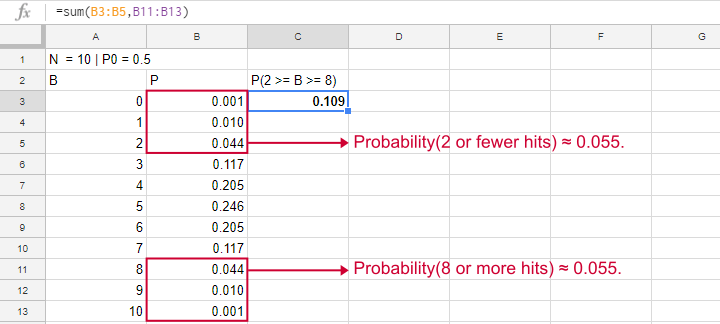
Binomial Test - SPSS
Perhaps the easiest way to run a binomial test is in SPSS - for a nice tutorial, try SPSS Binomial Test. The figure below shows the output for our current example. It obviously returns the same p-value of 0.109 as our Google Sheet.
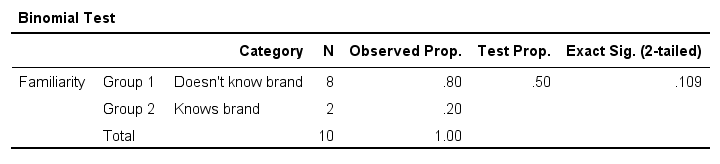
Note that SPSS refers to p as “Exact Sig. (2-tailed)”. Is there a non exact p-value too then? Well, sort of. Let's see how that works.
Binomial Test or Z Test?
Let's take another look at the binomial probability distribution we saw earlier. It kinda resembles a normal distribution. Not convinced? Take a look at the binomial distribution below.
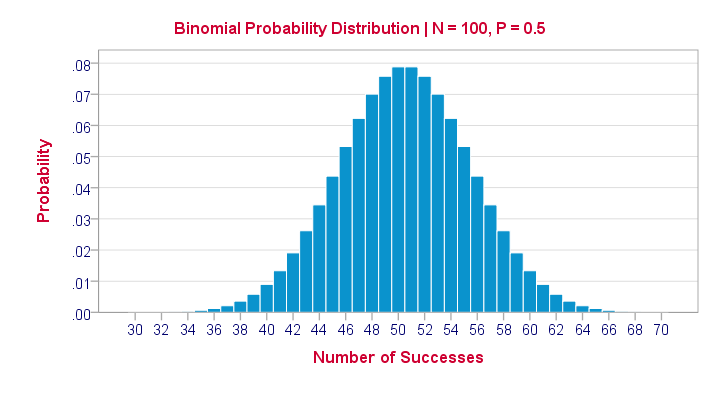
For a sample of N = 100, our binomial distribution is virtually identical to a normal distribution. This is caused by the central limit theorem. A consequence is that -for a larger sample size- a z-test for one proportion (using a standard normal distribution) will yield almost identical p-values as our binomial test (using a binomial distribution).
But why would we prefer a z-test over a binomial test?
- We can always use a 2-sided z-test. However, a binomial test is always 1-sided unless P0 = 0.5.
- A z-test allows us to compute a confidence interval for our sample proportion.
- We can easily estimate statistical power for a z-test but not for a binomial test.
- A z-test is computationally less heavy, especially for larger sample sizes.I suspect that most software actually reports a z-test as if it were a binomial test for larger sample sizes.
So when can we use a z-test instead of a binomial test? A rule of thumb is that P0*n and (1 - P0)*n must both be > 5, where P0 denotes the hypothesized population proportion and n the sample size.
So that's about it regarding the binomial test. I hope you found this tutorial helpful. Thanks for reading!